Scans
A scan is one execution of the pipeline against one target, by one agent.
The pipeline
The pipeline is split along one line: the runner executes the scanners and never touches the database; the ingestor reads its results and never runs a container. That is what lets identical code run inside the control plane or on a remote agent that holds no database credentials.
- Clone or pull the target into a temporary working directory.
- Catalogue it with Syft, producing the SBOM.
- Match known vulnerabilities with Grype.
- Secrets with gitleaks, under Vectispire's own configuration rather than one the target ships. The file, the line and the rule are kept — never the value.
- IaC with checkov, for Terraform and Kubernetes.
- Source code with Semgrep, if enabled — see Semgrep rule sets.
- Normalise everything into
Findingrows, enrich with EPSS and KEV, evaluate the license blocklist, check end-of-life, and reconcile against existing issues.
Steps 2 to 6 run in ephemeral containers with the network disabled, a read-only mount,
cap_drop: ALL and no-new-privileges. Every image is pinned by digest.
Besides fetching the target itself, the scanners make no network call. What does leave the machine, and when:
- the end-of-life lookup sends product names and versions (a runtime, a distribution) to the end-of-life catalogue — made before the scan's results are written, never while they are;
- a Semgrep rule-set plugin runs without a network unless its manifest declares the exception, with a justification recorded in the audit log (Plugins);
- the AI review, off by default, sends a repository's open findings — identifiers, components, paths, descriptions, never its source — to the model endpoint configured when its OWASP report is written: a machine you run, or, once a public endpoint has been explicitly allowed, a third party such as OpenAI (Settings). No scan sends code to a model.
EPSS scores and KEV status are read from FIRST's daily file and CISA's catalogue, which the control plane synchronises whole, so no third party learns which CVE a repository carries. No scanned source leaves your network, and with the AI review off or kept on it, no finding does either.
Reading a scan
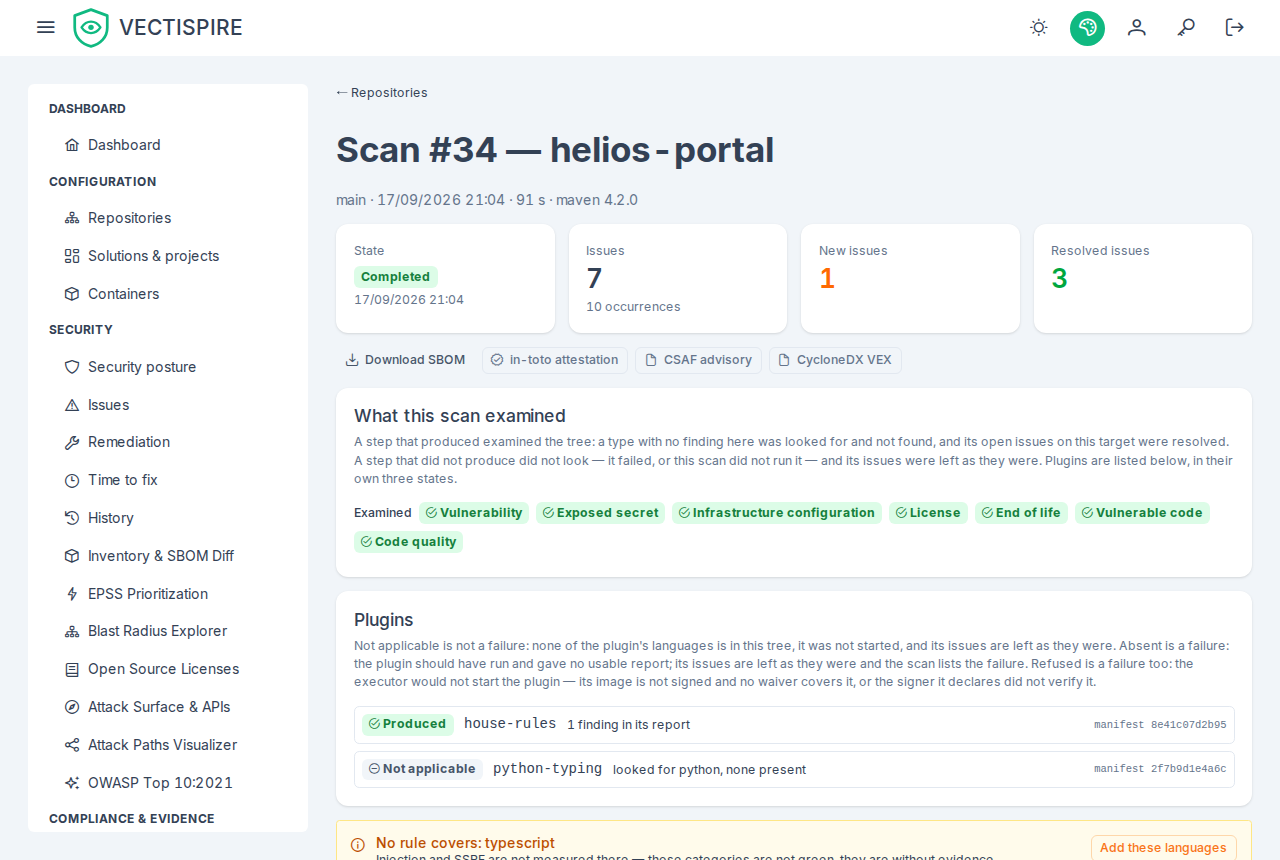
The scan detail shows what was found and, more usefully, what changed: issues that are new, issues that are now resolved. On a repository scanned nightly the standing total barely moves, and the delta is the entire news.
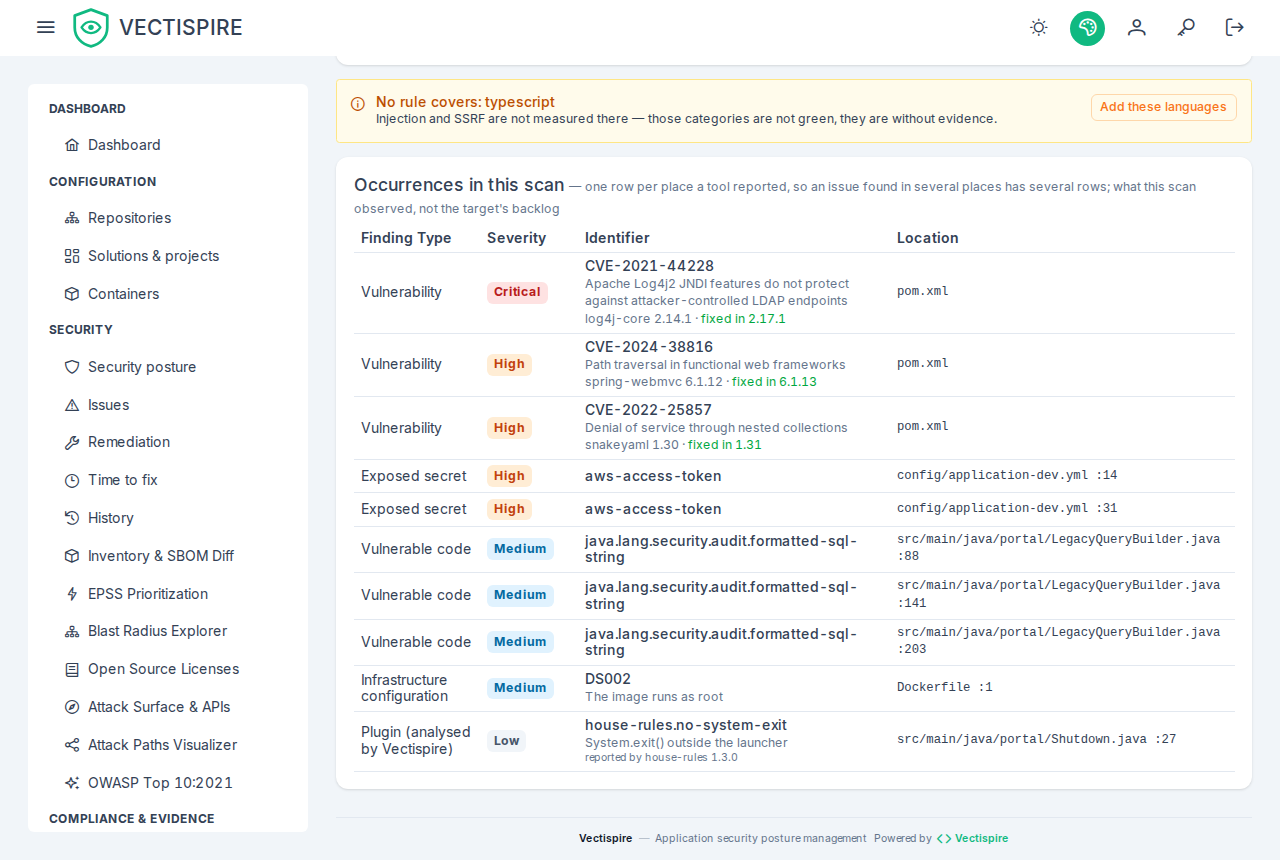
Issues and occurrences are two counts. The card at the top counts issues — the problems this scan saw open, one per fingerprint, the same unit as the issue list — and beneath it the occurrences: one per place a tool reported. The list further down holds the occurrences. A fingerprint carries no line number, so one rule hitting the same file on fifteen lines is one issue and fifteen occurrences, and a scan reading 28 issues · 56 occurrences above a list of 56 rows has lost nothing and duplicated nothing. The history and the dashboard's recent scans show the issue count.
The raw outputs are kept alongside the normalised findings — the SBOM as the cataloguer produced it, and the raw matcher output — for audit purposes. They are what you hand to somebody who wants to re-derive your conclusions rather than take them.
A What this scan examined card says which built-in steps looked at the tree: vulnerabilities, secrets, IaC, source analysis (security and quality together), end of life, licences. A step listed under Examined produced — a type with no finding in this scan was looked for and not found, and its open issues on the target were resolved. A step under Not examined did not look — it failed (the scan's message says which and why), or this scan does not run it, as an image scan runs no IaC or source analysis — and its issues were left as they were. A scan from before this was recorded says Not recorded rather than showing every step as not examined: nothing wrote down what it looked at, and the next scan of the target records it. The same record is what a checklist reads to say a repository was examined, so a step that failed never counts as one that ran clean.
When plugins ran, a Plugins card lists each one in one of three states, drawn apart: produced (green, with the number of findings in its report), not applicable (grey — none of its languages is in the tree; not a failure) and absent — failed (red, with the reason). Only the last is somebody's problem.
A scan that could not run
A scan that stops before any result exists — the clone refused, the task's credential unusable, the network down — is not retried blindly. A failure that another attempt would meet again fails the scan at once, with the reason: a host key that changed, an authentication refused, a repository, a branch or a sub-path that is not there, a URL the clone refuses. Anything else waits and retries: the scan goes back to the queue, Queued, and cannot be claimed again for one minute after its first attempt, five after its second — its page says the next may start at … — and fails for good at its third attempt. The same holds whether the built-in worker or an agent ran it. See Agents for how the kind is decided.
This is not a step that failed inside a scan that ran: that one leaves its own results absent, the others stand, and the scan says which step it was.
A failed scan is not a clean scan
A scan that failed produces no findings, and a target with no findings passes every policy. The Security overview names that state explicitly for this reason. Check it before reading a green dashboard as good news.
Common causes are in the FAQ.
Where it ran
Every scan records its agent. With a single-machine install that is always the built-in agent — the web process itself, created automatically at startup, which is why an install works with no agent configuration at all.
A result produced on a remote agent is indistinguishable from a local one: same rows, same enrichment, same policy, same reconciliation. See Agents.