Solutions and projects
Vectispire scans repositories one at a time, but people ask about products: how exposed is the payments platform, who can see the mobile app. Solutions and projects are how you tell Vectispire what the products are.
The model
- A solution holds projects — a product line, a platform, a customer offering.
- A project belongs to exactly one solution and references the repositories and the container images that make it up.
- A repository or an image is in at most one project. That is deliberate: a figure or a report must add up to one project without counting anything twice, and "which project is this in" must have one answer.
Names are unique regardless of case: a solution's across the installation, a project's within its
solution. Two solutions may each hold an "API". A name already taken is refused the same way whether
it is being created, renamed or moved into a solution: 409, with the type
urn:vectispire:problem:solution-name-taken for a solution and
urn:vectispire:problem:project-name-taken for a project, and the dialog stays open saying which name
is taken.
"No project"
Repositories and images that existed before you created any project start with no project. Nothing is inferred from their names, URLs or registries — an administrator files them.
"No project" is a group of its own everywhere it appears, never hidden: the tree lists those repositories and images under it, with their open issues, so a filing that is not finished looks unfinished.
Filing, moving and removing a repository or an image
Only administrators change the tree. Filing a repository or an image into a project moves it out of any project it was in; removing it returns it to "no project".
Filing is an access change. A grant on a project covers the repositories and images in the
project at the time of each request (see below), so moving one from a project to another takes it
away from the first project's holders and gives it to the second's, at once. The audit log records
every move in those words, under PROJECT_REPOSITORIES_CHANGED for a repository and
PROJECT_CONTAINERS_CHANGED for an image.
Moving a project to another solution
An administrator can move a project to another solution. Everything the project holds goes with it: its repositories and images stay filed in it, and its grants, its checklists, the plugins switched on for it and the SARIF sources scoped to it all name the project, not the solution, so none of them changes. Nobody gains or loses sight of anything: there is no grant on a solution, so a move only changes where the project is drawn in the tree — and which solution's figures and issue filter count it, from the next request on.
The move is refused when the target solution already holds a project of the same name, case aside
(rename one of the two first), and a solution that does not exist is answered as absent. Moving a
project to the solution it is already in changes nothing. The audit log records the move under
PROJECT_UPDATED, naming both solutions.
Grants on a project
In Users and teams, an account or a team can be granted a project, next to individual repositories and images:
- The grant covers every repository and every image in the project at the moment of each request. A repository or an image filed into the project next month is visible to the project's holders the moment it is filed, with nothing re-granted — and one taken out of the project is no longer visible to them through that grant, at once.
- Grants add up: what someone sees is the union of their repository, image and project grants, direct and through their teams.
- There is no grant on a solution. One level of inheritance is what an auditor can follow; a solution-wide grant is simply a grant on each of its projects.
- API keys cannot be restricted to a project: a key's restriction stays one repository or one image.
What a reader sees
The solutions tree is readable by every account, and shows only what that account may see:
- A project appears when the reader holds a grant on it or sees at least one of its repositories or images. It lists only the repositories and images the reader may see.
- A project the reader sees only in part — say, one repository granted out of three, or its repositories without its image — is marked partial, and its figures cover only what the reader sees. A partial grant sees a partial project, and says so, rather than presenting half a project as the whole of it.
- A solution appears when one of its projects does, and is partial when any repository or image filed under it is hidden from the reader.
- Administrators, CISOs and auditors see every solution and project, empty ones included.
- A
readAPI key reads the tree as its account does. A key restricted to one repository or image sees the projects holding it, partial, and nothing else — no project through its account's grants, no other target in "no project".
Each project, each solution and the "no project" group carries its open issues by severity, counted over the repositories and images the reader may see and leaving out settled triage (not affected, will not fix, fixed), like every other figure of risk.
Deleting
- Deleting a project returns its repositories and images to "no project" and revokes every grant naming the project. It deletes no repository, no image and no finding. The audit entry states how many repositories and images were detached and how many grants revoked.
- Deleting a solution is refused while it still holds a project: move its projects to another solution or delete them first, each one an audited decision of its own.
The screen
Solutions & projects, in the sidebar next to Repositories, draws the tree for every account: each solution, its projects, the repositories and container images filed in each, then No project last — shown even when it is empty. In each project and under "No project", the repositories come first, then the images, told apart by their icon: a branching tree for a repository, a box for an image — the one the sidebar gives Containers. Every solution, project and the "no project" group carries two counts, Repositories: N and Images: N, and one tag per severity that has open issues ("2 Critical", "1 High"), or "No open issues" — counted over the repositories and the images alike. A node you see only in part carries Partially visible: N repositories and M images you can see. A repository name opens the issues of that repository, an image name those of that image. A project name opens the project's page (below), and each solution carries Compliance & score, which opens the solution's compliance and score over what you see of it — the same drawing as the project page's.
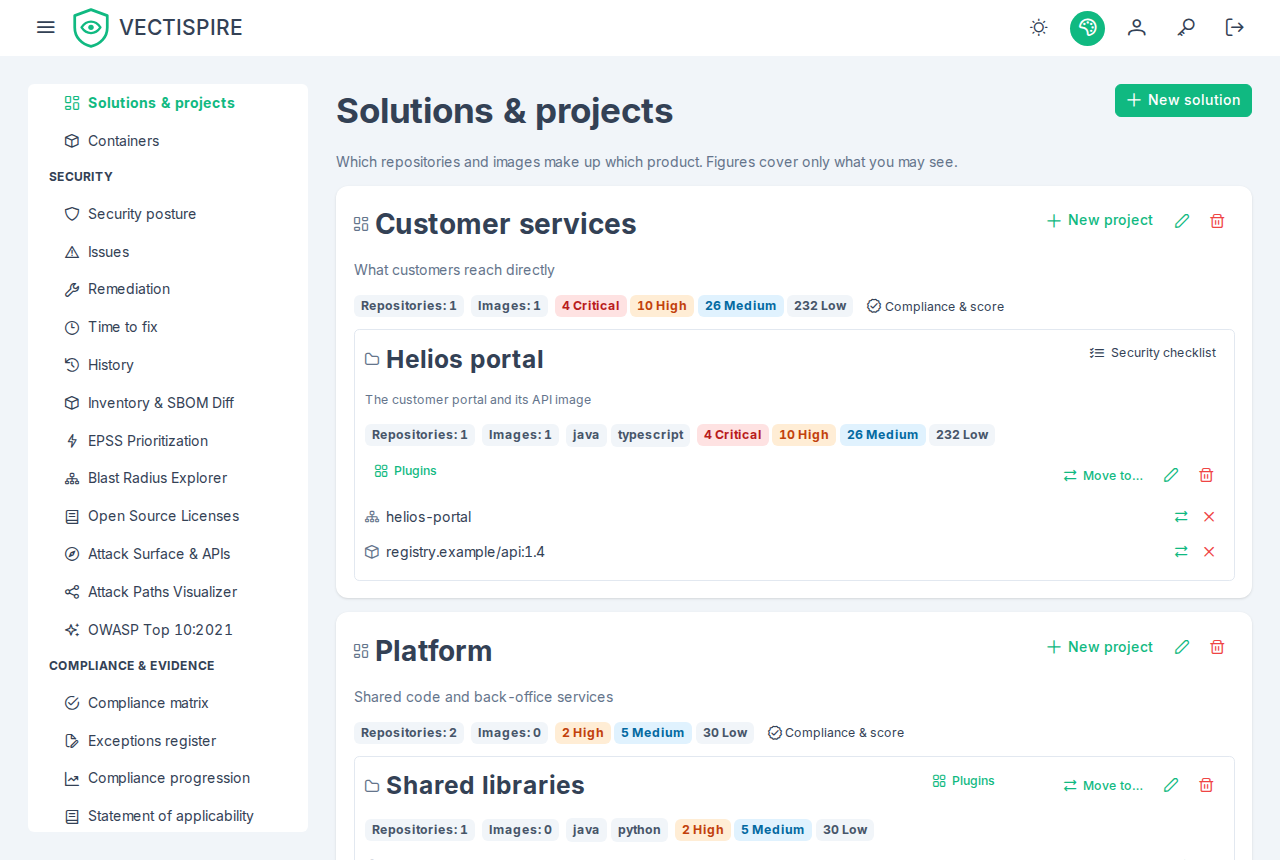
On a solution or a project, each severity tag is a link to the issues list narrowed to that solution or project, that severity, and Hide settled triage — the clause the tag counts by, so the list holds the number the tag showed. The tags of No project are figures only: the list has no filter for "in no project".
Administrators also get:
| Action | Where | What the screen says first |
|---|---|---|
| New solution | top of the page | — |
| New project | on a solution | — |
| Rename or describe (pencil) | on a solution or a project | — |
| Move to… | on a project | that everything the project holds goes with it and nobody gains or loses sight of anything; the solution is chosen among the others, with an optional new name |
| Delete (bin) | on a solution or a project | for a project: its repositories and images return to "no project" and every grant naming it is revoked; for a solution: refused while it holds projects, with the server's reason shown |
| File into project | on a repository or an image under "No project" | who gains sight of it: every account and team granted the project |
| Move (two arrows) | on a filed repository or image | who loses and who gains sight of it |
| Remove from project (cross) | on a filed repository or image | who loses sight of it |
An image is filed, moved and removed exactly as a repository is, through the same dialogs; each button is named after the repository or image it acts on for a screen reader ("Remove nginx:1.27 from its project"). A refusal — an image deleted in the meantime answers "Target not found.", one already taken out of that project "This image is not in that project." — is shown in the server's words, above the tree.
When a project is moved to a solution already holding a project of the same name, the move dialog stays open, says so, and takes a new name in the same dialog; once moved, the tree is redrawn and a notice says where the project went.
The destination project is chosen from a list grouped by solution. Names are limited to 100 characters and descriptions to 255, in the form as on the server. Other accounts see the same tree without any of these actions; the server would refuse them anyway.
The governance roles also get Plugins on each project: the registry with a switch per plugin, live for administrators, the CISO and the governor, read-only for an auditor, each plugin's languages set against the project's (see Plugins and SARIF imports). A project whose repositories have been counted shows the union of their languages as small tags beside its figures.
Repositories shows, on each repository, the project it is filed in — a link to that project in the tree — or "—" when it is in none. Containers shows the same on each image — Project: and a link to the project in the tree — or no project, a link to that group.
One project on its own: its figures, compliance and components
Four reads answer for one project — or, for compliance, one solution — rather than the whole tree, for
a screen or a reporting plugin that reports on one product. Each follows the tree's rule: you get the
project when you see everything, hold the project as such, or see at least one of its repositories or
images; a project you see nothing of is answered exactly as one that does not exist, 404 Project
not found. (Solution not found. for a solution).
- The project read is the project's node in the tree — its solution named, its repositories and images, open issues by severity, partial, whether its checklists are open to you, the languages detected — computed by the same code, so the two never disagree.
- Compliance per project and per solution is the estate's evaluation run over the project's
targets only: the same controls, the same coverage and freshness caps,
NO_DATAwhen none of its targets was scanned — however scanned the rest of the estate is — and the portfolio scorecard (score, grade, recommendations) computed the same way. A clean project in a dirty estate reads compliant. See Compliance. - The consolidated SBOM merges the components of the newest completed scan of each repository and image, by package URL and version, and names the targets carrying each. Every target is listed with what was read of it: listed, empty (its SBOM listed nothing), absent (its newest completed scan holds no SBOM) or never scanned. An older scan's inventory never stands in for a newest one without an SBOM, and the result says it is not complete while one target is absent or never scanned — a merge that skipped them silently would read "we do not ship this library" of a tree nobody looked at.
- The CycloneDX document of the same merge, with the project's CVE issues as VEX. Each component
names its carriers (property
vectispire:target);compositionssayscompleteonly when every target of the project was seen and read,incompleteotherwise, and the metadata names each target whose inventory is unknown. It is not signed, like the other exports.
A project you see in part is computed over the part you see, and says so (partial), like the
tree's figures and the issues list: every input is narrowed to the targets you see, so nothing of the
hidden ones reaches you beyond the fact that they exist. The security checklists are the exception:
their lines speak in words for every repository of the project, so they are refused to a partial
reader instead.
The project page
A project's page — its name in the tree, or /projects/{id} — gathers these reads for one product:
- The header: the project's name and solution, its description, Repositories: N and Images: N, the Partially visible tag in the tree's words when you see only part of it, the languages detected, Open issues: N — a link to the issues list narrowed to the project with Hide settled triage, the clause the figure counts by — and Security checklist when the checklist would open for you.
- Compliance and score: the scorecard (score out of 100, grade, the counts it is computed from,
its recommendations), then the estate compliance page's figures, per-target matrix, frameworks and
controls, drawn by the same component. Above them, Computed over N target(s), and on a partial
project a notice that the figures cover only what you see. A project none of whose targets was
ever scanned reads No data — a dash for every framework and for the score, not a grade: the
scorecard answers
NO_DATAwith no score, where it used to start at a hundred, subtract what it found and read A+ over nothing observed. A project scanned in part has its score capped at the scanned share. - Components: the consolidated list, filtered by name or package URL, each component with the targets carrying it; above it, Inventory by target gives each repository and image its state — N component(s), No component in its SBOM, No SBOM or Never scanned, with the date of the scan read. While one target is No SBOM or Never scanned, an Incomplete list banner says how many targets the list cannot speak for. Download CycloneDX saves the CycloneDX 1.5 document with its VEX.
A project that does not exist and one you see nothing of show the same This project does not exist,
or you see none of its repositories and images. A solution's Compliance & score page
(/solutions/{id}/compliance) draws the solution's scope the same way.
Through the API
The same operations, for scripts:
| Route | Who | Does |
|---|---|---|
GET /api/v1/solutions |
any account | the tree, as far as the caller may see |
POST /api/v1/solutions |
administrator | create a solution (name, description); 409 of type urn:vectispire:problem:solution-name-taken when the name is taken |
PATCH /api/v1/solutions/{id} |
administrator | rename or describe it; an absent field is kept; 409 of type urn:vectispire:problem:solution-name-taken when the name is taken |
DELETE /api/v1/solutions/{id} |
administrator | delete it; 409 while it holds projects |
POST /api/v1/solutions/{id}/projects |
administrator | create a project in it; 409 of type urn:vectispire:problem:project-name-taken when the solution holds the name |
PATCH /api/v1/projects/{id} |
administrator | rename or describe a project, or move it: solutionId; 409 with the type urn:vectispire:problem:project-name-taken when the solution it ends up in holds its name — renamed, moved or both — 404 for a solution that does not exist |
DELETE /api/v1/projects/{id} |
administrator | delete a project, as described above |
PUT /api/v1/projects/{id}/repositories/{repositoryId} |
administrator | file or move a repository |
DELETE /api/v1/projects/{id}/repositories/{repositoryId} |
administrator | back to "no project" |
PUT /api/v1/projects/{id}/containers/{containerId} |
administrator | file or move a container image |
DELETE /api/v1/projects/{id}/containers/{containerId} |
administrator | back to "no project" |
GET /api/v1/projects/{id} |
any account, read key | one project as its tree node describes it, with its solution (id, name) |
GET /api/v1/projects/{id}/compliance, GET /api/v1/solutions/{id}/compliance |
any account, read key | its compliance (compliance, the estate summary's shape) and scorecard, over the targets the caller sees; partial, targetCount |
GET /api/v1/projects/{id}/components |
any account, read key | the consolidated SBOM: components (each with the targets carrying it), targets (each with its inventory), complete, partial |
GET /api/v1/cyclonedx/projects/{id}/cyclonedx-vex.json |
any account, export key | the same as a CycloneDX 1.5 document with the project's VEX |
GET /api/v1/repositories and GET /api/v1/containers also say which project each repository or
image is in (projectId, projectName). In the tree, each project and the "no project" group list
their images under containers and count them in containerCount, beside repositories and
repositoryCount.
What stays repository-only
A project's security checklist still measures the project's repositories only, and is still shown to whoever sees every one of them: images do not enter a checklist's measurements, so a signed checklist says exactly what it said before. A project that is partial only because of an image you do not see therefore keeps its checklist open to you. The languages detected for a project and the plugins switched on for it are about source trees, so they concern its repositories too.
Related
- Users and teams — granting a project to an account or a team.
- Audit log — where creations, deletions and moves are recorded.
- Security checklists — a project's checklist, shown only to whoever sees the project whole.