Semgrep rule sets
Semgrep reads the source code itself — a concatenated SQL query, a command handed to a shell, an unverified TLS certificate. No other scanner here sees any of that.
It is off by default, and it runs with the network disabled like every other scanner.
Who can read, who can change
Reading the rule sets and their impact is open to administrators, the CISO and the Auditor role. Uploading a set, activating or deactivating one requires an administrator or the CISO.
Why you have to install rules yourself
Vectispire bundles a single rule.
That is a licensing constraint, not an oversight: the public Semgrep rule sets are not redistributable. Shipping them would put a redistribution problem into every deployment of this product.
So real coverage comes from a rule set you install. Enabling Semgrep without one gets you one rule's worth of findings and a false sense of coverage — which is worse than leaving it off.
Installing one
Obtain a rule set under a license that permits your use, and register it on Rule sets. Semgrep's own registry, your organisation's internal rules, or a vendor's — the constraint is on Vectispire redistributing them, not on you running them.
From the upstream catalogue
Fetch from the upstream catalogue clones opengrep/opengrep-rules, shows its licence and how many
rule files each language holds, and stores the languages you choose as a set — not activated. Choose the
languages you scan: every rule id becomes part of an issue's identity.
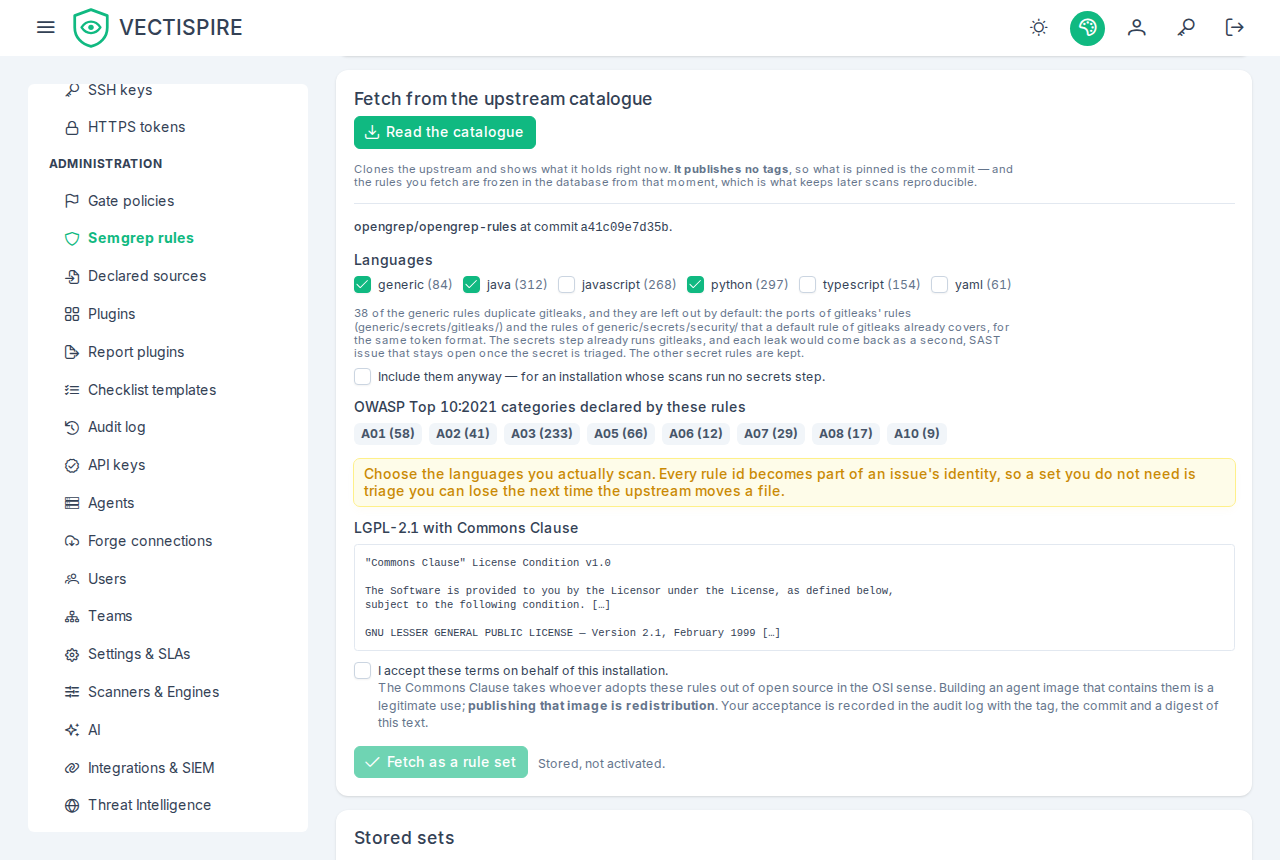
The rules that duplicate gitleaks are left out by default. The secrets step runs gitleaks with its
default rules — Vectispire's gitleaks configuration extends them — and generic holds two groups of
rules that look for the same thing:
generic/secrets/gitleaks/, some 175 rules ported from gitleaks itself;- 27 of the 50 rules of
generic/secrets/security/, each looking for a token format a dedicated default rule of gitleaks (v8.30.1, the version the secrets step runs) already finds: AWS access key ids, Artifactory, Facebook, GitHub, Google and Google Maps API keys, Heroku, JWTs, Mailchimp, Mailgun, Picatic, PGP and other private keys, SendGrid, Slack tokens and webhooks, Snyk, SonarQube, Square, Stripe, Telegram and Twilio, and the generic API key and generic secret rules.
Imported as well, each leaked key would be found twice: a secret issue and a SAST one, two issues
since the type is part of an issue's identity. Triaging the secret would leave its SAST twin open, where
it can still fail the gate, weigh on the score and count its OWASP category a second time. The screen
says how many it leaves out once generic is chosen, and Include them anyway brings both groups in —
for an installation whose scans run no secrets step. The other 23 rules of generic/secrets/security/
stay, because gitleaks' defaults do not look for what they do: a bcrypt hash, an /etc/shadow line, a
username and password in a URI, an AWS secret access key or session token, an _authToken in an
.npmrc, a Google OAuth access token…
A set imported before 0.11.0 with generic keeps those rules until you import again. Activating the
new set is then guarded like any other: their open issues are counted, by rule, before the button
goes ahead.
For a script: POST /api/v1/rule-sets/catalogue takes includeGitleaksDuplicates (false when
absent), and the preview's gitleaksDuplicates is the count it concerns, both groups together. A set
holding them is named … with gitleaks duplicates.
Security and quality
Semgrep findings arrive in two kinds:
- security — gated like any vulnerability;
- quality — visible in the backlog, and they can never fail a CI gate.
That boundary is structural rather than configurable. See Code quality.
Rolling it out
Expect a large first result on an existing codebase. Enable it on one repository, work through what it says, tune the rule set, and only then widen — turning it on estate-wide in one go produces a backlog nobody triages and a feature everybody ignores.
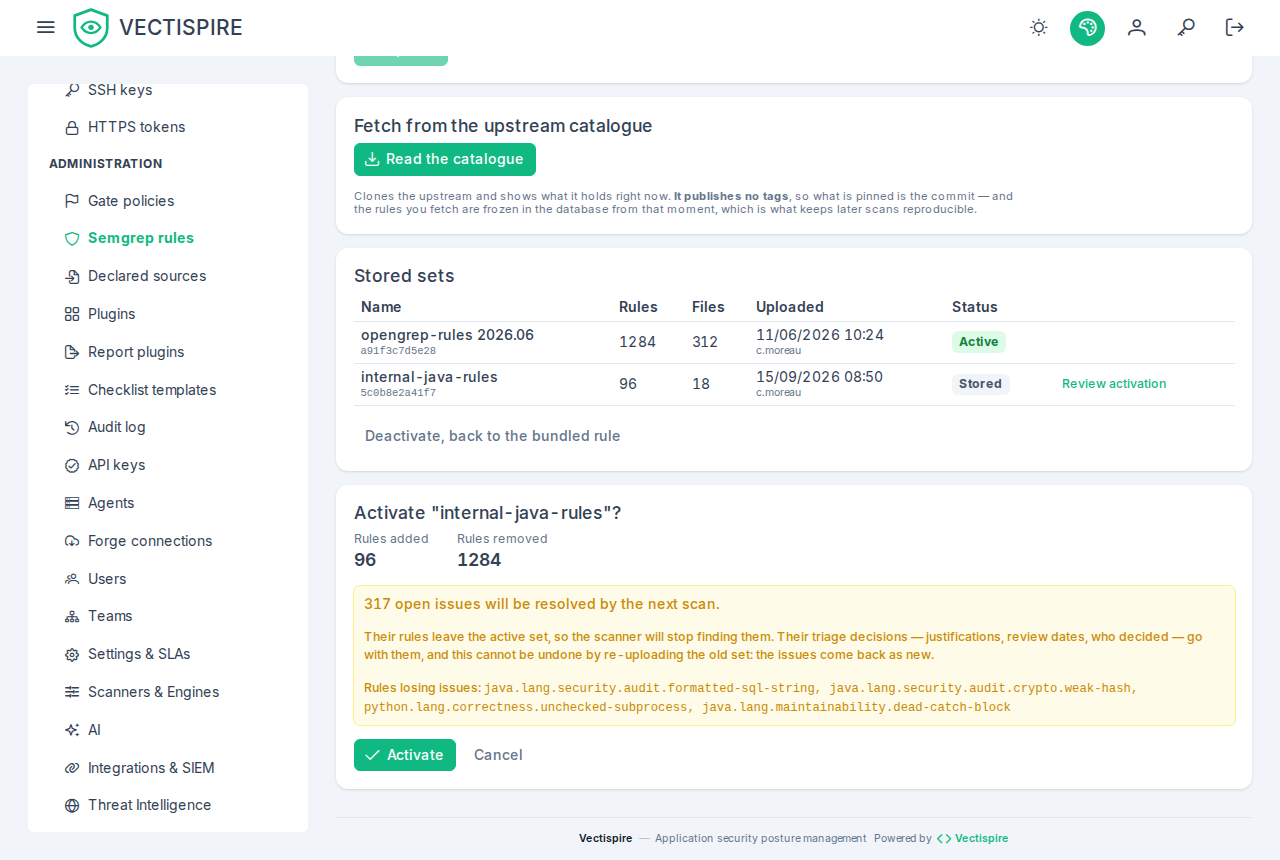
Activation says what it costs before it does it. The rules a new set drops are rules whose open issues resolve on the next scan, and their justifications, review dates and decider go with them. Re-uploading the old set does not bring them back: the issues return as new ones.
And it goes ahead only on that number. When the change would resolve at least one open issue, the Activate button — and Deactivate, back to the bundled rule, which drops the active set's rules the same way — is refused until you confirm the count the preview shows. The count is read again when you confirm: if findings arrived since the preview, you are shown the new number and asked again, so a preview taken earlier never authorises more loss than it displayed. A change that resolves nothing activates at once. The audit log records the loss you accepted, by number and by rule. The bundled rules run beside every set, so their issues are never counted as lost.
For a script: send acceptLosing with the preview's affectedIssues; a 409 of type
urn:vectispire:problem:rule-set-activation-loses-issues carries the current affectedIssues and
losingIssues. See the API reference.