Forge connections
A read-only connection to a GitHub or a GitLab, from which Vectispire will discover your repositories and let you choose the ones to import (decision 0037). This release ships the connections, the discovery of a GitLab's and a GitHub's repositories — a connection lists what its token can see and keeps it as a snapshot, compared run to run — and the selection and import of those repositories as ordinary targets.
Administrators only: on screen under Administration → Forge connections (below), and
through /api/v1/forge-connections (API reference).
On screen
Administration → Forge connections lists each connection as a card: the forge and its address, the kind of token and the scopes the forge reported, whether it can write — Read-only, Can write (a GitHub Enterprise Server classic token), or Not reported for a GitHub fine-grained token, which is unknown, not read-only — the token's expiry (announced fourteen days ahead, then Expired), the network statement, the pinned CA and its end of validity, the encryption state, the last discovery and the number of targets imported through it.
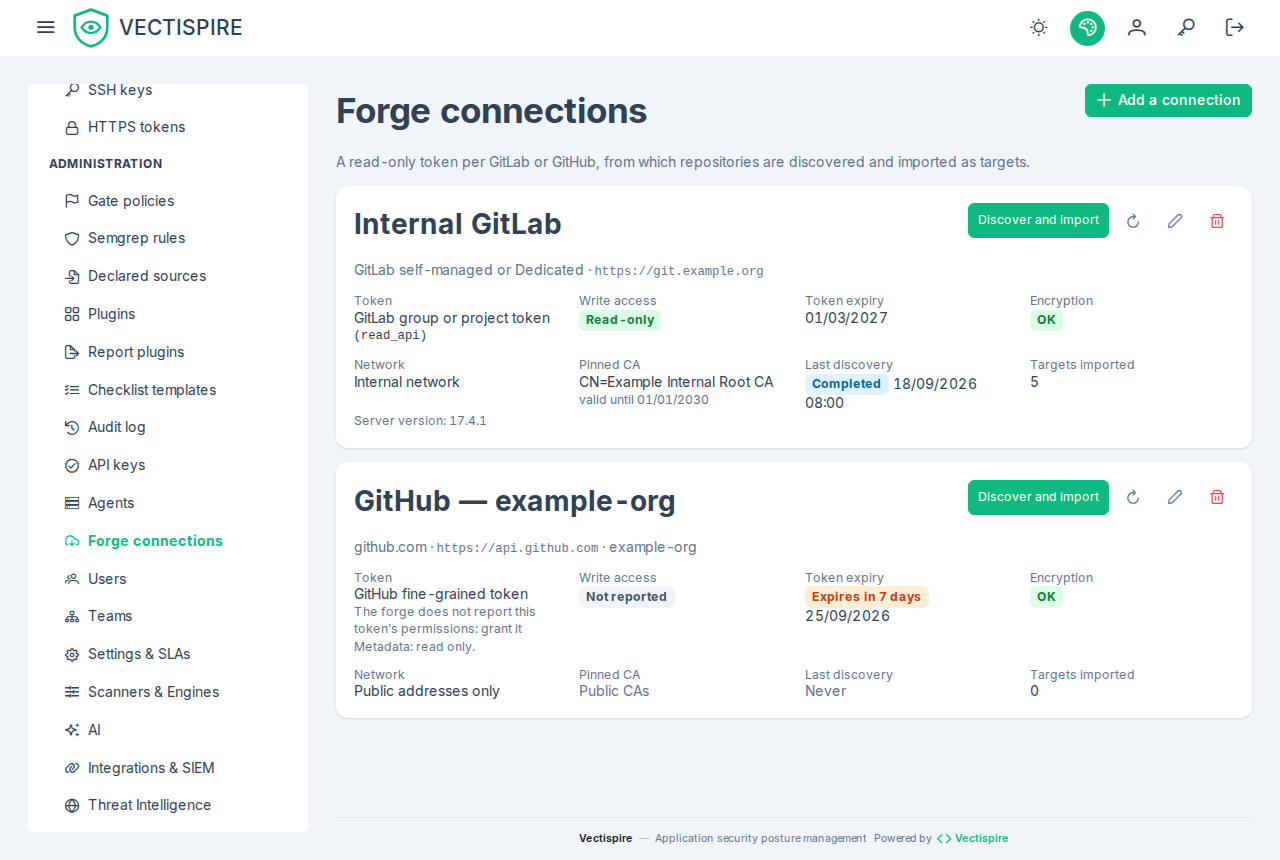
- Add a connection: the forge, a name, the web address (blank for gitlab.com or github.com), the owner for GitHub, the token. For a self-managed server, tick This server is on the internal network and paste your CA in PEM: the form reads the paste before sending it and says in words what is wrong — a private key, not a certificate, a certificate cut short, more than eight — and the server then checks that it is a CA and still valid. For a cloud address neither option is offered. Check and save presents the token to the forge; a refusal is shown as the server words it — the token rejected or expired, a scope outside the read-only ones, a server older than GitLab 16 or GitHub Enterprise Server 3.12, an unknown owner, an address the outbound guard blocks — with the rest of the form kept and the token cleared.
- Replace the token (the circular arrow): checked like a new one; refused, the stored token is unchanged.
- Edit (the pencil): the name, the network statement, and the CA — keep it, pin another, or unpin it. The address cannot change.
- Delete (the bin): the confirmation says how many imported targets lose their provenance, and that the targets stay.
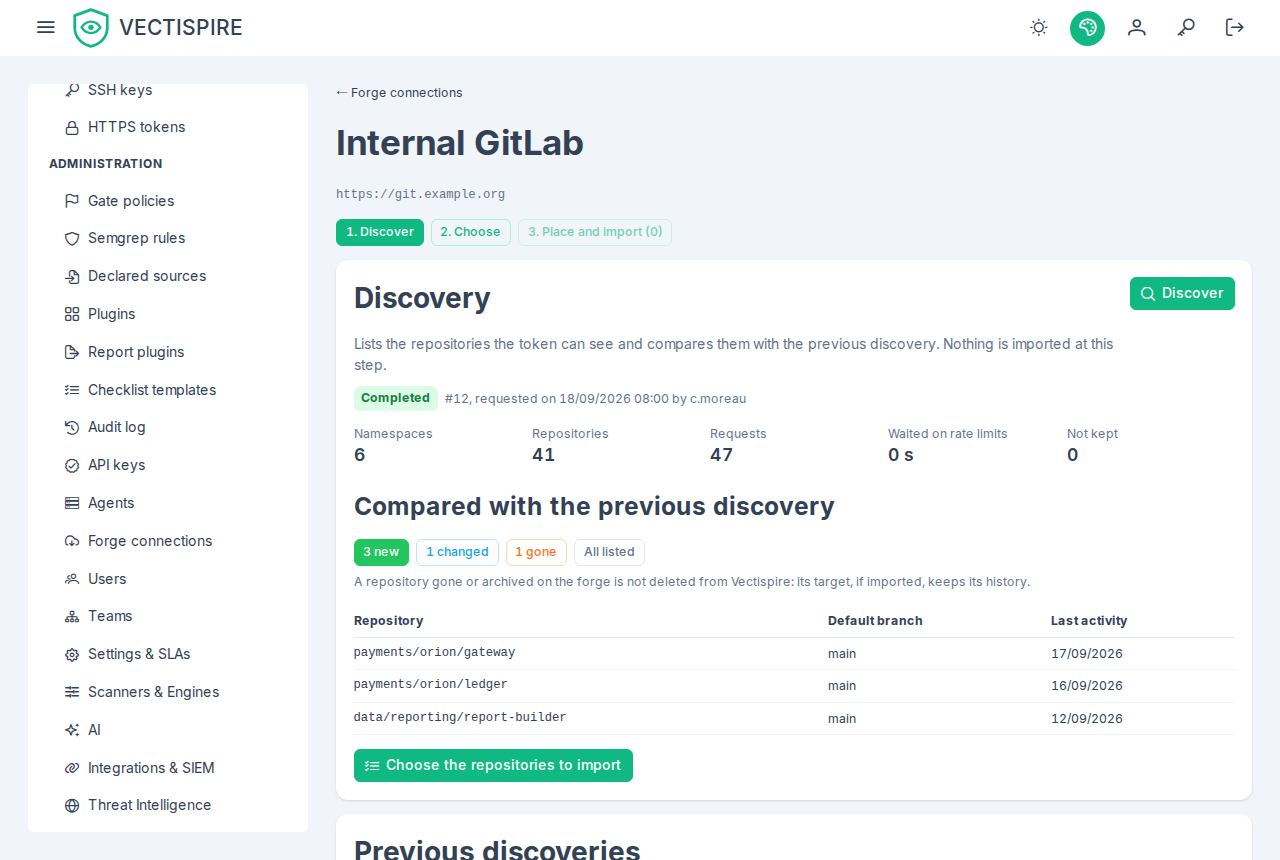
Discover and import opens the connection's page, in three steps.
- Discover. Discover queues a run; the page follows it by itself — every two seconds, then twice as long each time nothing moved, up to thirty, and not at all once it ends or you leave the page — with its counters: namespaces, repositories, requests, seconds waited on rate limits, repositories not kept. If a run is already going, the page names it and offers to follow it. A partial run says why (thirty minutes, twenty thousand repositories, a rate limit — with the time it lifts) and that nothing was marked gone; a failed one says why in words, with the server's detail below. Once it ended, the comparison's figures — new, changed, gone (a completed run only), all listed — each open the list they count. The previous runs are listed below.
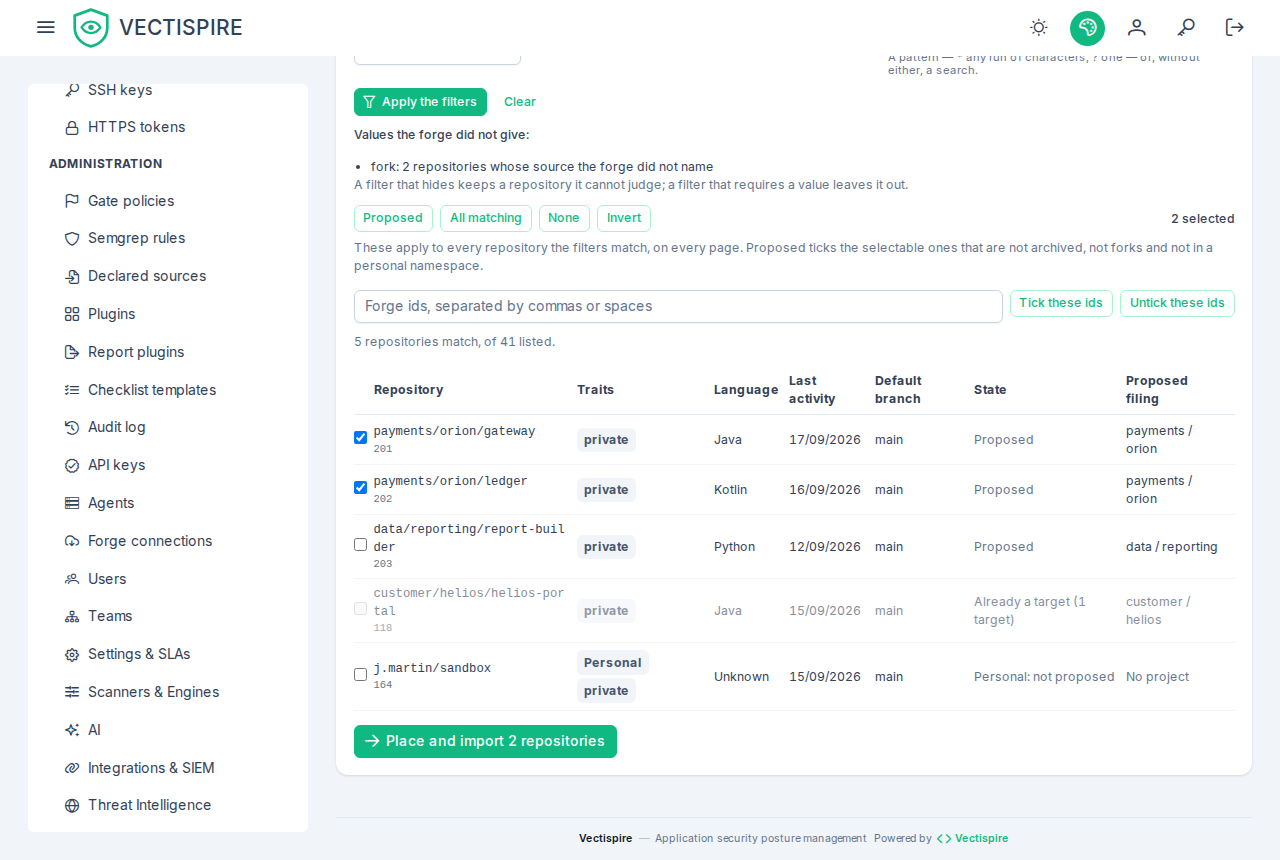
- Choose. The table of the latest discovery that ended completed or partial, filtered and paged by the server: archived, forks, personal namespaces, targets already present (each hidden, shown, or the only ones), visibility, inactivity in days, language, namespace and a path pattern. Under the filters, what each filter could not judge is counted — GitLab names a fork's source only when the token can read it — with the rule: a filter that hides keeps what it cannot judge, one that requires leaves it out. The selection starts from the proposal, which leaves personal namespaces unticked; Proposed, All matching, None and Invert apply to everything the filters match, on every page; a row ticks one repository; forge ids can be pasted. A repository already a target, already imported or empty is shown greyed with why, and an id the server could not tick is named.
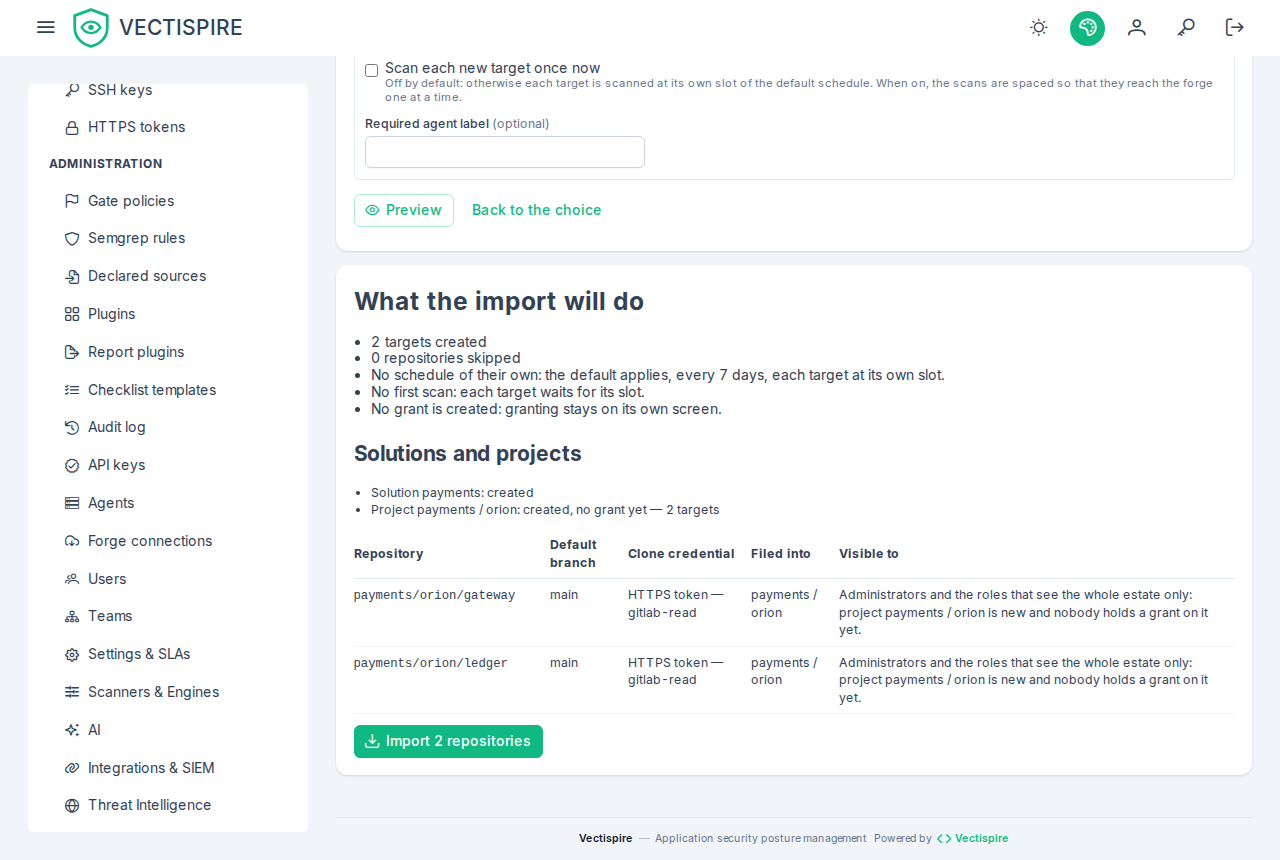
- Place and import. Where each namespace is filed — the proposal, editable per namespace or, ticking Edit per repository, per repository: another solution, another project, or No project; existing names are suggested. The clone credential per host — the proposal, none, an HTTPS token bound to that host or an SSH key. Scan each new target once now (off by default) and the seconds between two first scans (10 to 600). Then Preview: targets created, repositories skipped and why, repositories refused with the form's reason (the import is refused whole while one is), solutions and projects reused or created, the credential and who will see each target — administrators, plus the accounts and teams granted a reused project; a new project's targets are visible to administrators only. Any change after the preview asks for a new one before Import is offered: what is imported is what was previewed. An import takes at most a thousand; the rest stay ticked for the next one.
The result lists the targets created — each linked to its issues and, when queued, its first scan — and
those skipped, and points at the audit log, where the import is summarised once as Repositories imported
from a forge (FORGE_IMPORT_APPLIED).
What a connection is
A name, a forge (github or gitlab), its web address — the one in your browser's address bar,
https only — and a token. Leave the address blank for github.com or gitlab.com. For GitHub, also the
owner: the organisation or user the token was issued for.
| You run | Address to type | API reached |
|---|---|---|
| gitlab.com | (blank) | https://gitlab.com/api/v4 |
| GitLab self-managed or Dedicated | https://gitlab.example.org (a path prefix such as /gitlab is kept) |
…/api/v4 |
| github.com | (blank) | https://api.github.com |
| GitHub Enterprise Cloud with data residency | https://acme.ghe.com |
https://api.acme.ghe.com |
| GitHub Enterprise Server | https://github.example.org |
…/api/v3 |
Do not type the API's address: …/api/v4 is refused with the address to type instead.
The connection's token never clones. Clone credentials stay the SSH keys and HTTPS tokens you already manage, chosen per host at import: the discovery token is read-only, stays in the control plane, and is never sent to an agent.
The token to create
| Forge | Create | Grant |
|---|---|---|
| GitLab | a group access token — a bot member that outlives the person who made it — or a personal access token; role Reporter on the groups to discover | read_api only |
| GitHub (github.com, ghe.com, Enterprise Server that offers them) | a fine-grained personal access token, resource owner = the connection's owner, repository access All repositories or a selection | Metadata: read, and nothing else |
| GitHub Enterprise Server without fine-grained tokens | a classic personal access token | repo (to list private repositories) and read:org (to list the organisations it belongs to) |
GitLab: read_api, and only read scopes. The token is accepted with read_api plus, at most,
read_repository, read_registry or read_user. Anything else — api, write_repository, sudo,
admin_mode, the runner and Kubernetes scopes, and any scope GitLab adds later — refuses the connection:
the list is an allow-list. The connection shows whether the token is a group or project access token
(gitlab_bot) or a person's (gitlab_personal); prefer the first.
GitHub fine-grained tokens: Vectispire cannot check their permissions. GitHub does not report them
through its API. The connection shows scopes: null and canWrite: null — unknown, not read-only.
Grant Metadata: read only; that is a sentence, not a check.
GitHub classic tokens are accepted on Enterprise Server only, and flagged. On github.com and ghe.com
a classic token is refused: the only classic scope that lists private repositories, repo, can also
write to every one of them, and a fine-grained token is always available there. On Enterprise Server a
classic token holding repo or public_repo is accepted and shown canWrite: true — in the list,
the audit entry and the SIEM event. Administration scopes (admin:org, delete_repo, workflow, the
package scopes…) are refused.
GitHub organisations enforcing SAML single sign-on. A classic token must be authorised for each such organisation (on GitHub: Settings → Developer settings → Personal access tokens → Configure SSO); until it is, GitHub refuses it that organisation's repositories. A discovery then marks the organisation not readable with this token, says why, and goes on with the others (below). A fine-grained token is approved by the organisation instead, and needs no such step.
A checklist line measuring change reviews needs one more GitHub permission. A
change_review line reads merged pull
requests and their reviews, which Metadata: read does not include: grant the fine-grained token
Pull requests: read as well — still read-only — or those lines say forge_unreadable, naming the
permission. Administration: read lets the reading see a classic branch protection too; without it the
rulesets and the history still answer. GitLab's read_api already covers it (below).
What remains, written rather than hidden. A GitHub Enterprise Server classic repo token can write.
GitLab's read_api can also read files through the API. The connection is a standing read access to the
list of an organisation's repositories, held by the control plane.
Probed before it is kept
On creation, and whenever the token or the way it is presented changes, Vectispire presents the token to the forge once and reads what the forge says about it:
- GitLab:
GET /api/v4/personal_access_tokens/self(scopes, expiry, revoked),GET /api/v4/version(GitLab 16 or later),GET /api/v4/user(bot or person). A token holding a refused scope is not presented a second time. - GitHub:
GET /users/{owner}— the scopes of a classic token, the token's expiry and, on Enterprise Server, its version (3.12 or later) arrive as headers. A 404 means the owner does not exist or is hidden from this token.
A refusal says why in words: token rejected or expired, read_api missing, a refused scope, a server too
old, an unknown owner, or an address that cannot be reached.
On your internal network, behind your own CA
A self-managed GitLab or a GitHub Enterprise Server on the internal network is the common case.
- Say so: tick internal network (
internalNetwork: true). Without it the address must be public: an address resolving to a private or local range is refused before anything is sent, and the refusal is recorded and signalled to the SIEM (VECTI-SEC-036) — a base URL aimed inward is how a server-side request forgery through this form would look. With it, private addresses are accepted; link-local addresses and the other cloud metadata addresses (100.100.100.200,fd00:ec2::254,192.0.0.192,168.63.129.16), the unspecified address (0.0.0.0,::), Vectispire's database and its Docker daemon — on any loopback address when they listen on this machine — stay refused whatever you tick. The address is checked again at every request, since a name may resolve elsewhere tomorrow. - Pin your CA (
caPem): paste the CA that issued the server's certificate, in PEM. It must be a CA (a server's own certificate is refused), currently valid, and at most eight certificates. It is trusted for this connection alone, instead of the public CAs, and the server's certificate must still name the host you typed. There is no "skip verification" switch and there will not be one: the token would go to whoever answers first on the path. - Neither applies to github.com, ghe.com or gitlab.com: their hosts are public and verified against the public CAs, and both are refused for them.
A CA that expires stops the connection; replace it with a PATCH, which probes the stored token again
through the new CA before keeping it.
Rotation, changes and deletion
- Replace the token in place (
PUT …/token): it is probed like a new one, and the connection keeps its identity and everything that will hang on it. A replacement the forge refuses leaves the stored token untouched. The expiry the forge reported is shown (tokenExpiresAt). - Rename, change the network statement or the CA (
PATCH). The address cannot change: another server is another connection. - Delete (
DELETE): no target goes with it — an imported repository is a target like any other. Its discoveries, its snapshot and the provenance of the targets imported through it go with it; the targets stay, and only stop saying where they came from.
Discovering repositories
POST /api/v1/forge-connections/{id}/discoveries asks for a discovery and answers at once, 202, with the
run — pending. A control-plane instance takes it within seconds and lists the forge in the background; poll
GET …/discoveries/{discoveryId} for its progress.
What is listed (GitLab). The groups the token belongs to (GET /groups?min_access_level=10), then every
project it is a member of (GET /projects?membership=true&min_access_level=10&statistics=true, keyset pages
by id), then the main language of each project that is new or active since it was last read (GET
/projects/:id/languages). The two parameters are not optional: without them gitlab.com lists every public
project of the service. A token sees what its role lets it see — give it Reporter on the groups to
discover; a Guest's projects are listed all the same, without their size or, for private ones, their
language.
What is listed (GitHub) — github.com, ghe.com and Enterprise Server alike, through the API root of the
table above. GitHub lists one owner at a time, and which owners depends on the token, read again at every run
(GET /user):
- a fine-grained token is issued for exactly one resource owner, the connection's: that organisation's
repositories (
GET /orgs/{owner}/repos?type=all), or the user's own (GET /user/repos?affiliation=owner) when the owner is the token's user; - a classic token (Enterprise Server) sees every organisation its user belongs to: the connection's owner,
then each organisation
GET /user/orgsnames, then the user's own repositories.
The user's own repositories are a personal namespace: listed, flagged personal, offered unticked. GitHub
states every field in its listing — the language too, so a GitHub discovery makes no request per repository —
and always states fork and archived, which are therefore never unknown here. The last activity is
pushed_at; the size is GitHub's, in kibibytes, stored in bytes; the visibility may be internal on
Enterprise Server and Enterprise Cloud. An empty GitHub repository still names a default branch: it is
offered, and its first scan says there is nothing to scan.
An organisation the token cannot read is not a failed run. A 403 or a 404 on one organisation — single
sign-on not authorised for the token (X-GitHub-SSO: required), an IP allow list, an organisation refusing
this kind of token, an organisation renamed or hidden — marks it not readable with this token: the run goes on
with the others, ends completed, and lists it in unreadableNamespaces with the reason in words (also in
detail). The screen does not show that list yet: it shows a run's detail only beside the reason of a
partial or failed run, so a completed run with an organisation it could not read looks complete there — read
the discovery through the API to see which. None of its repositories is marked gone by that run: a refusal is not an absence. Two refusals
name no organisation: single sign-on filters GET /user/orgs rather than refusing it (X-GitHub-SSO:
partial-results, by id), and a classic token without read:org is refused that list. Either way the run
records it (a path of null) and marks gone only repositories of the namespaces it did read. A 401 still
fails the run — the token is the problem, not one organisation.
What is kept per repository: the forge's id (stable across renames and moves), the full path, the namespace,
the name, the default branch, archived, fork, visibility, last activity, main language, size, and the HTTPS,
SSH and web URLs. A value GitLab did not give is kept empty — unknown, never zero: no size without
Reporter, no language when the language request is refused, no default branch for an empty repository, and
fork only when GitLab names the source project (it names it only when the token can read it). A repository
in a user's own namespace is listed and flagged personal: the selection will offer it unticked.
Its states.
| State | Meaning |
|---|---|
pending |
waiting for an instance — or resumed after the instance running it stopped |
running |
listing; the counters move: namespaces and repositories seen, requests made, seconds waited on rate limits |
completed |
every page was read; repositories no longer listed are marked gone — except in a namespace the token could not read (unreadableNamespaces) |
partial |
a bound ended it (below); what was read is kept and compared, nothing is marked gone |
failed |
token_rejected (401: replace the token), forge_refused (a listing answered 403 or 404: the token needs read_api), forge_unavailable (no answer after three retries), destination_blocked, cross_origin_page, connection_unusable (the token no longer decrypts, or the pinned CA expired), executor_lost, internal_error |
One discovery per connection at a time: a second request answers 409 forge-discovery-in-progress, with
the running one's discoveryId.
Bounds. Thirty minutes and twenty thousand repositories per run; past either the run ends partial
(time_bound, repository_bound). A rate limit is honoured, never raced: a wait of up to a minute
(Retry-After, GitHub's X-RateLimit-Reset, GitLab's RateLimit-Reset) is spent inside the run — GitHub's
secondary limits, a 403 or 429 with Retry-After, included; a longer one ends it partial, rate_limited,
with rateLimitResetAt saying when to run it again. A server that does not answer is retried three times
with back-off, ten seconds per request, then the run fails.
The comparison. Each run is compared with the snapshot the connection's earlier runs left. Once it ends,
newCount, changedCount and goneCount say how it moved, and GET …/discoveries/{discoveryId}/repositories
lists the repositories (change=all), the new ones (new), those renamed or moved, given another default
branch, archived, unarchived or back after being gone (changed, with changeSummary), and those no longer
listed (gone). Only a completed run marks a repository gone — a partial listing proves nothing about
what it did not reach, so goneCount is empty and change=gone is refused for it. Nothing is ever deleted
from the snapshot but with the connection: a gone or archived repository stays, and a target imported from
it keeps its history.
The same door as the probe. Every request goes through the outbound guard — the address re-checked at
each request, private only when you said the server is internal — and the CA you pinned. The next page is
followed only on the connection's own scheme, host and port, and under its API's path (/api/v4 on
GitLab, /api/v3 on Enterprise Server, so a neighbour served behind the same name never sees the token;
an encoded %2e in the path is refused): a page pointing anywhere else fails the run
before anything is sent there, recorded FORGE_CONNECTION_REFUSED and signalled VECTI-SEC-036; so is an
address the guard now refuses. The token is decrypted for the run and never leaves the control plane — a
discovery runs on the control plane, on every instance, whatever the built-in worker's switch, never on an
agent. A restart in the middle resumes the run from its first page; after three lost attempts it fails
executor_lost.
Administrators only, like the connection: a discovery names repositories no grant covers yet. Each discovery queued is audited FORGE_DISCOVERY_REQUESTED in the requester's name; it is not
signalled to the SIEM — the standing access is the connection, signalled VECTI-SEC-034.
Selecting and importing
Once a discovery has ended completed or partial, its repositories can be selected and imported as ordinary
targets. The selection reads the connection's latest such discovery: a pending, running or failed one
answers 409 forge-discovery-not-selectable, and an older one 409 forge-discovery-superseded with
latestDiscoveryId — the snapshot now describes the newer run. A partial run is selectable: what it listed it
listed whole, and nothing is inferred from what it did not reach.
The table — GET …/discoveries/{discoveryId}/selection — lists the repositories by full path, 100 a page
(limit up to 500), each with:
presentAs: the targets that already file it. A repository is already present when the identity of its HTTPS or its SSH clone URL — host and path, lower case, without scheme, user, port or.git— equals that of an existing target's URL, whatever that target's branch and sub-path: the rule the repository form refuses a duplicate by.git@git.example.org:Acme/API.gitandhttps://git.example.org/acme/apiare one repository, and a monorepo split into three sub-path targets shows three ids.importedAs: the target an earlier import from this connection made of it — recognised by the forge's id, so a repository renamed on the forge is still that target.selectable, andnotSelectablewhen it is not:already_imported,already_present,no_default_branch(an empty repository: nothing to clone yet),no_clone_url.offered: whether the selection proposes it ticked — selectable, not archived, not a fork, and not in a personal namespace, which is offered unticked.proposedSolutionandproposedProject, below.
Filters: archived and forks (hide by default, show, only), inactiveDays (hides a last activity
older than that), language, visibility, namespace (that group and everything below it), path (a pattern —
acme/payments/*, * any run of characters, ? one — or, without either, a search), personal and present
(show by default, hide, only). A filter never judges what GitLab did not say: one that hides keeps a
repository it cannot judge, one that requires leaves it out, and unjudged counts them per filter — GitLab
names a fork's source only when the token can read it, so most repositories have no fork flag at all, and
hiding them would hide most of the estate.
The selection is a set of forge ids that the screen holds; what is imported is what was ticked, never what a
filter matches at import time. POST …/discoveries/{discoveryId}/selection applies one operation to what the
filters match — proposed, all, none, invert, or add and remove with forgeIds — and answers the
selection, dropping (and naming in dropped) any id that cannot be ticked.
Where each repository is filed — proposed, shown, editable. GitLab: the top-level group is the solution, and
the repository's parent group below it the project (acme/backend/payments/api → solution acme, project
backend/payments); a repository directly under the top-level group goes to a project named after that group. GitHub,
which has no level between an organisation and its repositories: the organisation is the solution, and each
repository its own project, named after it (acme/api → solution acme, project api). A personal namespace,
on either forge: no project. A solution or project of the same name (case aside) is reused, never renamed
or moved. A mapping rule changes the proposal for a namespace and everything below it, or for one repository by
its forgeId: another solution, another project, or noProject. The most specific rule wins on each field,
so renaming acme's solution keeps every subgroup's project.
The preview — POST …/imports/preview, nothing written — says what the import would do: the targets with
their URL, default branch, credential, solution and project, and who will see them (visibleTo):
administrators, plus the accounts and teams granted a reused project, counted; a new project has no grant yet, so
its targets are visible to administrators only until somebody makes one — or, when visibility is not restricted
on your installation, every signed-in account. It lists the repositories skipped and why, those the import would
refuse with the form's own reason, the solutions and projects reused (existingId) or created, the credential per
host, the default schedule and the first scans.
The import — POST …/imports, the preview's body:
- At most 1,000 repositories, in one transaction: everything is created or nothing. A larger selection is several imports.
- Through the forms' own gestures: the same refusals (a host off the allow-list, a token presented to another host…) and the same audit entries as a repository, a solution or a project added by hand. A repository the form would refuse refuses the import — 400 naming the first ones; the preview lists them all.
- Planned again inside its transaction. Whatever became a target since the preview is skipped
(
already_present,already_imported); replaying an import creates nothing. Two administrators importing the same selection at once create each target once: the second import waits on the first one's key, then skips what it created. - The clone credential, per host (
credentials:host, thensshKeyIdorhttpsTokenId). An SSH key clones over GitLab's SSH URL; an HTTPS token — bound to that host — over its HTTPS URL; none, over the HTTPS URL, for public repositories. A host you do not name takes the proposal: the one HTTPS token bound to it when there is exactly one, none otherwise. A private repository imported with no credential is allowed and warned about — its scans will fail with requires authentication. The connection's own token never clones: it can list the organisation, it is not sent to agents. - Cloned from the connection's host only. The clone URL the import would use — HTTPS, or SSH with a key — must
name the host of the connection's address (
github.comfor github.com, whose API answers onapi.github.com). A repository the forge lists with a clone URL on any other host is refused, named in the preview, and no credential of that host is proposed for it: the listing is the forge's answer, and it decides neither where Vectispire clones nor which host's token goes there. A GitLab whose SSH clones go through a host of their own imports over HTTPS; add such a repository by hand to clone it over SSH. - Branch: the forge's default branch at the discovery. A later change of default branch shows as changed in the next discovery; the target is not altered.
- Schedule: none of its own, so the installation's default applies — and each new target takes it at its own slot in the coming week, not all of them at the next tick.
- First scan: off by default. With
firstScan, each new target's first scan is queued and held back so that they reach the forge one at a time: the k-th waits k ×spacingSeconds(60 by default, 10 to 600). Three hundred repositories at the default are five hours of clones. - No grant. New targets are visible to administrators and to whoever holds a grant on the project they are filed into. Granting stays on its own screen.
The result lists what was created — each target's id, URL, solution, project and first scan — and what was
skipped. The connection's importedTargets counts the targets imported through it that still exist.
Provenance. Each imported target is linked to its connection and the forge's id. Deleting the target deletes the link — the repository is offered again; deleting the connection deletes every link and no target.
Change reviews: what the checklists ask the forge
A checklist line bound to a change_review rule
— every merge request is approved by a peer — is measured from the forge, through the connection that
imported the repository, or one whose discovery listed a repository with the same URL. Nobody asks for
it on screen: an hourly maintenance turn reads the repositories and branches such lines ask about, each
again once its reading is six hours old, as far back as the widest window bound to it, and keeps what it
read for the line. A checklist read on screen calls no forge.
| Forge | Requests, per repository and branch | Token |
|---|---|---|
| GitLab, every edition | GET /projects/:id (the default branch); GET /projects/:id/approvals — on the Community Edition and the Free tier, a 404, and nothing more of the settings is asked; on Premium and Ultimate, GET /projects/:id/protected_branches/:branch and GET /projects/:id/approval_rules; then GET /projects/:id/merge_requests?state=merged&target_branch=…&updated_after=…, a page per hundred, and GET /projects/:id/merge_requests/:iid/approvals once per merged merge request |
read_api, the scope the connection already holds — the probe's allow-list is unchanged — and the Reporter role on the project (a Guest is refused a private project's merge requests); where the token is refused the protected branch, the settings prove nothing alone and the history decides |
| GitHub | GET /repositories/:id; GET /repos/:owner/:repo/rules/branches/:branch and …/branches/:branch/protection; GET /repos/:owner/:repo/pulls?state=closed&base=…, newest update first until one is older than the window, and GET …/pulls/:number/reviews once per merged pull request |
fine-grained: Metadata: read and Pull requests: read (Administration: read for the classic protection, optional); classic (Enterprise Server): repo |
Bounded, like a discovery. A reading stops at 500 merged changes — the line then says
review_incomplete rather than judging part of the window —, at two minutes, and waits out a rate limit
of up to a minute; a turn reads for five minutes at most, and what it does not reach is read at the next.
A rate limit or a forge that does not answer leaves the previous reading in place until it is stale; a
refusal is a reading and is kept as one. Every request goes through the connection's own door — its
address, its pinned CA, its network statement, its token on its own origin only — as a discovery's does.
What is kept, per repository and branch: when it was read, the connection and the forge's id, and
the evidence — the settings in one sentence, and per merged change its reference (!12, #12), when it
was merged, how many people other than its author approved it and whether its author did. No name of a
person is kept. The readings go with the target when it is deleted, with the connection when it is
deleted, and when no line asks about the repository any more.
What it does not see, written rather than hidden: a push straight to the branch on a GitLab without approval settings (protect the branch so that one is not possible); a GitLab Premium Prevent approvals by users who add commits setting, which is not read; a GitHub ruleset's bypass list, which the rules endpoint does not state.
Encryption
The token is encrypted under ENCRYPTION_KEY with the row as its context, so a ciphertext copied into
another row does not decrypt. It is never returned by any route, written in the audit trail or logged.
encryptionState reads previous_key while a key rotation has not reached the row:
saving the connection (any PATCH) or replacing its token re-seals it under the current key.
Audit and SIEM
| Gesture | Audit | SIEM |
|---|---|---|
| Created, token replaced, network statement or CA changed, deleted | FORGE_CONNECTION_CHANGED |
VECTI-SEC-034 (6) |
| Renamed | FORGE_CONNECTION_CHANGED |
— |
| Refused for a blocked address or a refused scope | FORGE_CONNECTION_REFUSED |
VECTI-SEC-036 (5, failure) |
| Refused for anything else — a mistyped token, an old server | — | — |
| A discovery queued — never a request refused because one is already running | FORGE_DISCOVERY_REQUESTED (the connection, the discovery's id, the requester) |
— |
| A discovery stopped by a next page on another origin, or an address the guard refuses | FORGE_CONNECTION_REFUSED |
VECTI-SEC-036 (5, failure) |
| An import: each target, solution and project created | SETTING_UPDATED (Repository added: … — imported from connection …), SOLUTION_UPDATED, PROJECT_UPDATED |
— |
| An import, once, summarised: counts, skipped, first scans, credentials per host | FORGE_IMPORT_APPLIED |
VECTI-SEC-035 (5) when it created something |
The entries name the forge, the address, the owner, the kind of token, its scopes and whether it can write; never the token. See the SIEM catalogue.