Repositories
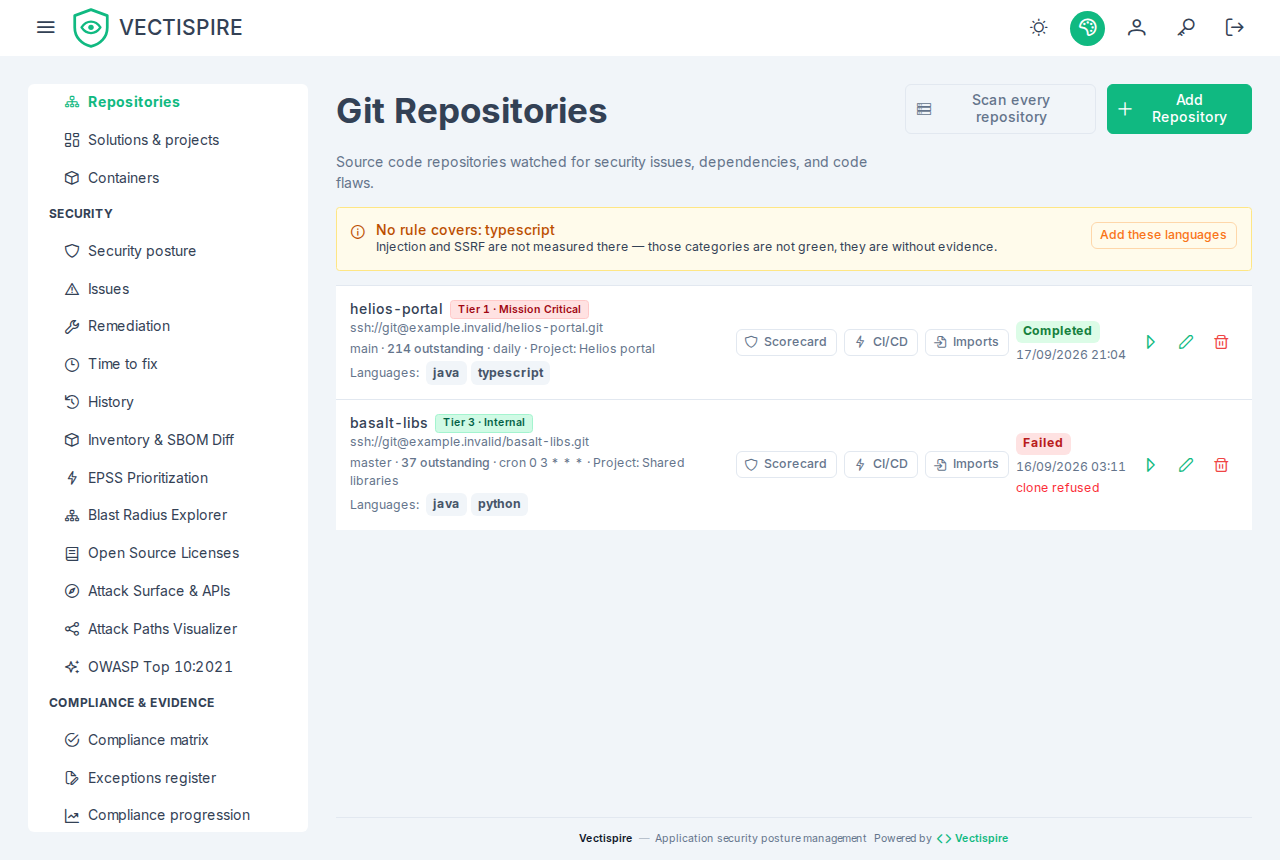
A repository is a scan target: a clone URL, a branch, optionally a sub-path, and a recurrence.
Registering one
Repositories → add.
| Field | Notes |
|---|---|
| Repository URL | HTTPS for a public repository, SSH where a deploy key is needed. Give the address the forge actually serves: a clone follows no HTTP redirect, to any host, because the host it would reach was never checked. A moved or renamed project fails with "answered with a redirect … to <host>" — register the new address. |
| Display name | What every other screen calls it. |
| Branch | The branch scanned on every run. |
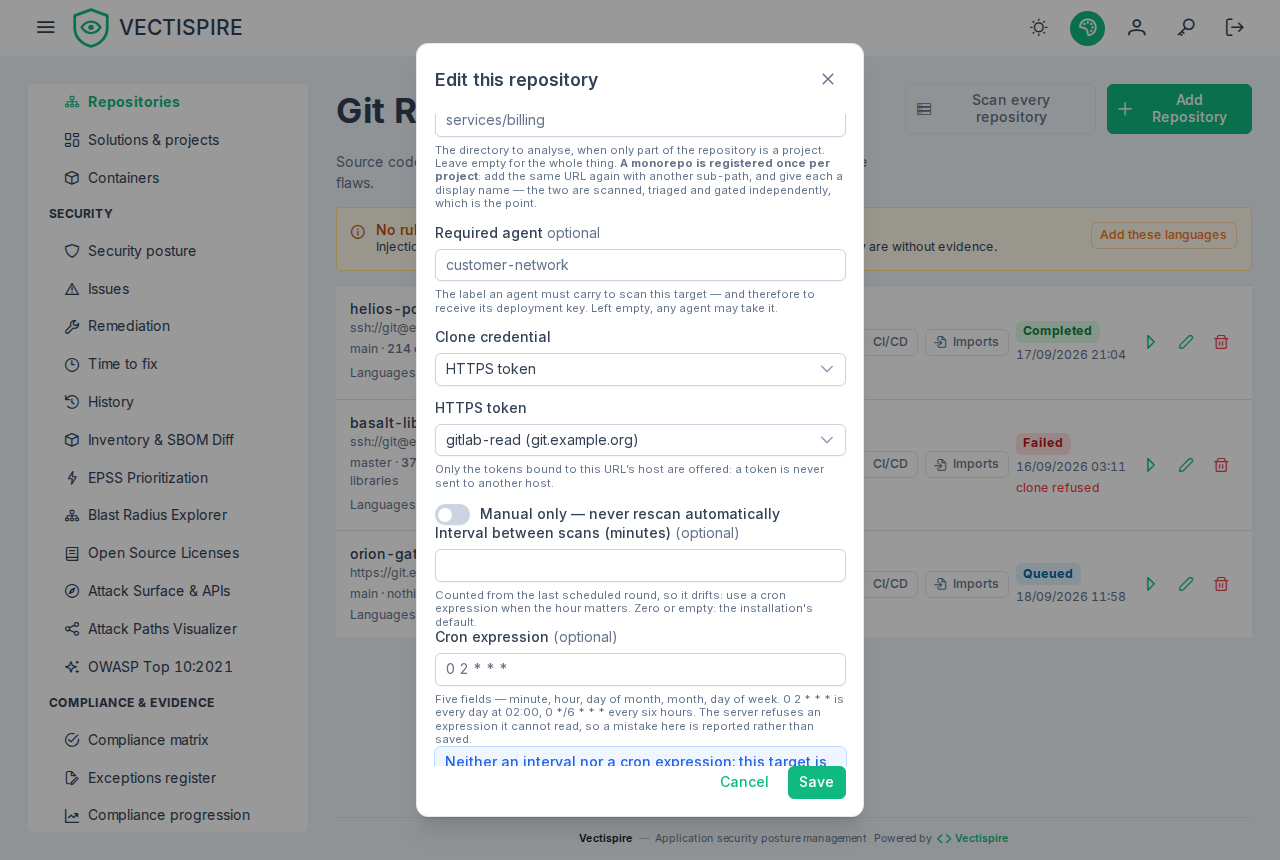
| Sub-path | For a monorepo. Register a monorepo once per project, not once for the whole tree — otherwise one SBOM conflates several applications' dependencies and no verdict means anything. Relative to the repository root — services/billing — with no .. segment and no leading /; a directory that is a link out of the repository makes the scan fail rather than analyse something else. |
| Business criticality tier | Tier 1 · Mission Critical, Tier 2 · Operational, Tier 3 · Internal. |
| Required agent | Pins the scan to one agent. Leave empty unless the repository is only routable from a particular network segment. |
Filed once
A target is a repository, a branch and a sub-path, and each is filed once: adding one that already exists — or editing a target into another's twin — is refused with "This repository is already a target, on the same branch and sub-path", followed by the existing target's name when you can see it.
Two URLs are the same repository when they agree once the scheme, the user part, the port, the case, a
trailing .git and trailing slashes are set aside. git@gitlab.example.org:Team/API.git,
ssh://git@gitlab.example.org:2222/team/api and https://gitlab.example.org/team/api/ are one
repository, gitlab.example.org/team/api.
- Another directory of a monorepo is another target, and so is another branch — a maintained
release/2.xbesidemainhas its own dependencies and its own backlog. A sub-path is compared as written, case included (Services/APIis notservices/api); so is a branch. - What is not recognised. Two names of one server —
git.example.organdgitlab.example.org, a name and its IP address — are two repositories, and so is a forge that serves SSH and HTTPS under different paths (Bitbucket Data Center's/scm/prefix). Two servers on one host name and two ports are taken for one. - Case is ignored in the path: two repositories differing only by case on a case-sensitive server would be taken for one. GitHub, GitLab and Bitbucket all refuse such a pair.
- A target you cannot see is not named. The refusal then says the repository is already a target and nothing of which one. Only administrators register repositories, and they see every target.
Filed twice before this release
Targets registered twice before 0.11.0 are kept: both are scanned, both stay editable, and nothing is deleted at the upgrade — either one may hold the triage you want to keep. The oldest of each group is the one a new filing is compared with. An administrator lists them with:
curl -s -H "Authorization: Bearer $TOKEN" https://vectispire.example.org/api/v1/repositories/duplicates
Each group gives the shared repository, branch and sub-path, and its targets oldest first, in the shape
of the repository list (id, displayName, openIssues, projectId, lastScan…). To merge one:
- Choose the target to keep — the one whose issues carry the triage you want: issues and their triage belong to a target and are not moved from one to another. When neither has any, keep the oldest, the first of the group.
- Carry over what the other holds and the kept one lacks: its project, tier, schedule, credential, required agent, certified scope, published badge.
- Export the other one's detection and triage history if the record must outlive it.
- Delete the other one (see Deleting a repository).
The route then no longer lists the group. If the target you kept was not the oldest, it is compared with new filings from the next maintenance turn on — within the hour.
Credentials
Private repositories authenticate with a deploy key registered under SSH keys. Give it read-only access at your provider — Vectispire only ever clones.
The private half is encrypted at rest with your ENCRYPTION_KEY. Storing a key is refused
outright until that variable is set.
Over SSH: the forge's host key
A clone with a deploy key checks the server's host key against a known_hosts file kept by
whichever executor runs the scan — the control plane's built-in worker or an agent:
- First contact: the key is accepted and written to that file.
- Every clone after it: the key must match. If it does not, the scan fails with "The host key of … has changed since the last clone. Check it is the same server before running again." and nothing is fetched. After a genuine rotation at the forge, delete that host's line from the file; the next scan records the new key.
- Pinned instead of learned: write the forge's keys into the file yourself (from
ssh-keyscan, compared with the fingerprints your forge publishes) and make the file read-only for the executor. It is then only matched against: a host it does not list is refused, and nothing is ever added.
The file is <home>/.ssh/known_hosts of the executor's process. In the shipped
docker-compose.yml that is $VECTISPIRE_WORK_DIR/home/.ssh/known_hosts for the control plane and
$VECTISPIRE_AGENT_WORK_DIR/home/.ssh/known_hosts for the agent — see
Installation. Nothing else of that directory is read for a
clone with a key: no identity, no agent, no config — a Host alias, a Port, a ProxyJump or a
StrictHostKeyChecking there has no effect on it. Put the real host and port in the repository URL.
A local agent: fill in known_hosts before its first clone
An agent in local mode receives no key, and clones with its machine's own SSH access — the
identity, config and known_hosts of its home's .ssh, used whole. That is ssh's own
behaviour, and it refuses a host its known_hosts does not list: nobody is there to answer
"are you sure?". The first scan then fails with "The host key of … was refused by this machine's
own known_hosts: the host is not listed there, or its key has changed." This is deliberate — a
first contact recorded without a check is the moment an interception would be believed — so the
file is filled in once, by you, after checking the key.
The file is <home>/.ssh/known_hosts of the agent's process: in the with-agent profile,
$VECTISPIRE_AGENT_WORK_DIR/home/.ssh/known_hosts; for the agent image run on its own,
/home/vectispire/.ssh/known_hosts unless you set -Duser.home. On the agent's host:
# 1. Fetch the forge's host keys (add -p <port> for a non-standard port).
ssh-keyscan -t ed25519,ecdsa,rsa gitlab.example.com > known_hosts.new

# 2. Print their fingerprints and compare EACH with the ones the forge publishes — GitHub and
#    GitLab.com list theirs in their documentation; for your own server, ask its administrator for
#    the output of `ssh-keygen -lf /etc/ssh/ssh_host_ed25519_key.pub`. Any difference: stop.
ssh-keygen -lf known_hosts.new

# 3. Install the file for the agent's user (1000:1000 in the images).
home="${VECTISPIRE_AGENT_WORK_DIR:-/var/lib/vectispire/agent-work}/home"
sudo install -d -m 0700 -o 1000 -g 1000 "$home/.ssh"
sudo install -m 0644 -o 1000 -g 1000 known_hosts.new "$home/.ssh/known_hosts"
ssh-keyscan fetches the keys over the same network an interception would sit on: step 2, against
a fingerprint obtained some other way, is the check, and skipping it records whatever answered.
The identity the agent clones with goes beside it ($home/.ssh/id_ed25519, mode 0600, owned by
1000) — a key dedicated to this agent, never your own. Do not set StrictHostKeyChecking no in a
config there to get past the refusal: it would accept any server, a changed key included.
Over HTTPS, with a token
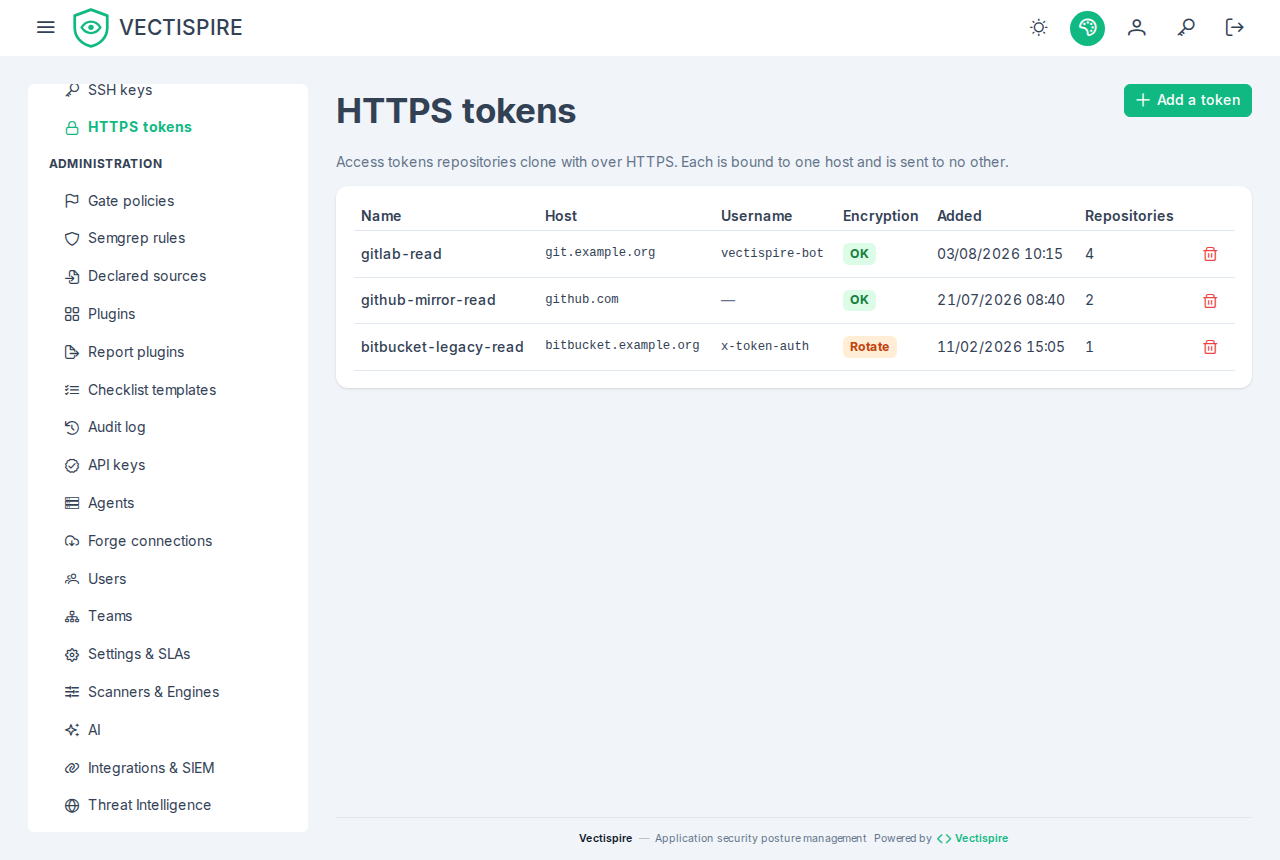
A repository reachable only over HTTPS clones with an HTTPS token — a personal, project or deploy token issued by the forge, with read access to the repository. Register it under HTTPS tokens, next to SSH keys in the menu, with:
- the host it is issued for (
gitlab.example.com, no scheme or port). The token is presented to that host and to no other: a repository whose URL names another server cannot use it, and a redirect to another host receives nothing — that was measured, not assumed; - a user name if your forge wants one beside the token; left empty, a placeholder is sent, which GitLab, GitHub and Gitea accept.
A repository uses an SSH key or an HTTPS token, of the kind its URL calls for. The token is
encrypted like a key, never shown again, and reaches an agent only in delegated mode, sealed; a
local agent receives none.
A token written into the URL is no longer accepted (https://user:token@host/…): it was stored
in the clear in the repository row and sent to every agent. Repositories already registered that
way keep working; to move one, remove the credential from its URL and attach a token.
Recurrence
A repository is rescanned in one of four ways, and the list says which, next to the last scan:
- the default — neither an interval nor an expression: the installation's default rescan interval, a week unless an administrator changes it. The list shows "weekly (default)";
- a custom interval, in minutes — "every 6 h";
- a cron expression, five fields — "cron 0 2 * * *". The expression wins when both are present;
- manual only — a switch in the dialog: never rescanned by the schedule, whatever the default. Switching it on empties the interval and the expression.
Since 0.11.0 an empty schedule is the default and no longer "never": a repository added without touching the schedule is rescanned weekly. Under the default each repository has its own moment in the week, derived from its identifier, so an estate is spread over the interval rather than scanned all at once, and keeps that moment from one week to the next. An interval of your own is counted from the last round, as before.
A round is skipped when a scan of the repository is already waiting or running: the one under way is the round.
Prefer cron. An interval drifts a few minutes on every run, so a scan configured for 03:00 migrates into the working day over a few weeks — and a scan that competes with the working day is the scan somebody eventually turns off.
Recurrence is the point of the product rather than a convenience: new vulnerabilities are published against code that has not changed, so a repository scanned once is a repository whose posture is known as of a date in the past.
Business criticality tiers
Three tiers, and they exist so that ranking can account for what a target is rather than only for what was found in it:
- Tier 1 · Mission Critical
- Tier 2 · Operational
- Tier 3 · Internal
The same critical CVE is a different problem in a payment path than in an internal scratch tool. Without a tier, the backlog says they are the same.
Project
Each repository shows the project it is filed in, linking to that project in Solutions and projects, or "—" when it is in none. Filing is done from that screen, by an administrator — and it is an access change: a grant on a project covers the repositories filed in it.
The README badge
Each repository can expose a dynamic badge for its own README, showing the security posture grade — the letter alone, never the score's risk points: the badge is anonymous, and the points would tell anyone reading it how much is open and when that moves. It puts the grade in front of the people who commit, which is where it changes behaviour.
How the scorecard grade is computed
The grade on a repository's scorecard and on its badge is the same number. It is computed when asked for, from the repository's backlog as it stands — nothing is stored. The formula is decision 0036, since 0.11.0.
What counts. Open issues of that repository only. Resolved issues are left out, and so are issues triaged not affected, will not fix or fixed — the three decisions that already stop an issue failing the gate. An issue whose dismissal is awaiting approval still counts: a request is not a decision. A triage status Vectispire does not recognise counts too, rather than being read as settled.
The risk points add up what is open, each issue and each disallowed licence once:
| Element | Risk points | Per |
|---|---|---|
| Actively exploited vulnerability (CISA KEV), whatever its severity | 25 | issue |
| Critical | 10 | issue |
| High | 4 | issue |
| Medium (or no severity) | 0.5 | issue |
| Low | 0.125 | issue |
| Licence not allowed by the licence policy | 4 | component |
An exploited issue counts as exploited only, not also under its severity.
The score is 100 × e^(−risk points / 55), rounded, and never below 1. Each issue removes a share of what is left rather than a fixed number of points: the score falls quickly for the first issues and keeps falling, ever more slowly, so a backlog twice as large always scores lower — fifty mediums no longer read like five hundred, and a team deep in F still sees its risk points fall as it fixes. Any actively exploited issue caps the score at 54, the top of D. A completed scan earns nothing: having one is what gets a target graded at all.
Reachability is not a term. Vectispire runs no call-graph analysis, so nothing establishes whether a component's vulnerable code is called. Every critical weighs the same.
The grade:
| Score | Grade |
|---|---|
| 95 and above | A+ |
| 85 – 94 | A |
| 70 – 84 | B |
| 55 – 69 | C |
| 40 – 54 | D |
| below 40 | F |
For example: one critical is 10 risk points, 83, B; one exploited critical 25 points, 63 held at 54, D; fifty mediums 25 points, 63, C; one disallowed licence 4 points, 93, A. A scanned repository with two criticals, one high, one actively exploited medium, two mediums, four lows and one disallowed licence has 10 + 10 + 4 + 25 + 0.5 + 0.5 + 0.5 + 4 = 54.5 risk points and scores 37, grade F.
The risk points are on the card (riskPoints), beside the score, for whoever is signed in — never
on the public badge. They are a sum of what is open, not a percentage.
No scan, no grade. A repository or image with no completed scan has nothing to grade: its
scorecard reads grade NO_DATA with no score and no risk points (score and riskPoints are
null), and its badge reads no data in grey. The counts stay, being true of what was read; a SARIF
import alone does not make a target scanned. A scan in progress, or one that failed after a completed
one, does not take the grade away: the backlog graded is the one the last completed scan left.
A project or a solution — the scorecard under a project's compliance —
is graded by its weakest link: the lowest score among the targets of it you see that hold a
completed scan, each computed as its own card computes it, and weakestTarget names that target
(kind, id, name, its own score, grade and risk points). A scope is no safer than its most exposed
target, and its grade does not depend on its size: twenty repositories of four mediums each, every
one 96, A+, make an A+ project — not the D that adding their backlogs up would give. A target never
scanned does not compete. The scope's risk points are the sum of its open backlog, each issue and
each licence entry once however many of its targets name it, so a large scope still shows how much is
open. None of its targets scanned is NO_DATA. Some of them scanned caps the score at the scanned
share, rounded, and adds the recommendation Scan the N target(s) never scanned: ten targets with
one scanned clean score 10, not 100 — the compliance controls' coverage cap, read over the same
targets. totalTargets and observedTargets say what the card covers. The compliance freshness
window does not cap it: that window is a setting of each deployment, and a grade must not differ
between two installations holding the same estate.
The portfolio has no single grade. A grade over a whole estate is either crushed by its size or
the worst target's grade under another name; neither tells you what to do next. The dashboard —
and GET /api/v1/scorecards/global — shows instead how many of the targets you see read each grade,
No data included, the weakest of them by name, and the risk points of everything open. See
Dashboard.
What does not move the grade. Issues past their remediation deadline are counted on the scorecard and produce a recommendation, but cost no points: deadlines are a setting of each deployment (see Remediation times), and a badge must not change grade because somebody edited a window. Nor can an installation change the weights: two installations holding the same estate grade it the same.
The recommendations list, when they apply: disallowed licences, no completed scan yet — an in-toto attestation is issued from a completed scan, so there is none before —, actively exploited vulnerabilities, criticals, highs, and overdue issues.
This grade is also the one in the dashboard's maturity ranking: a target reads the same score and the same letter there — see Dashboard.
Grades dropped in 0.11.0, and nothing in the repositories changed. The formula before it charged 25 for an exploited issue on top of its severity, 8 for a critical, 4 for a high, 5 for a licence, nothing for mediums and lows, and gave 5 for a completed scan; it reached 0 at twenty-seven highs and read fifty and five hundred mediums alike at 100. Mediums, lows and every further issue count now, so most grades read lower the day an installation upgrades. The dashboard's trend chart marks that day.
Other weights, to compare (experimental)
Experimental — nothing on a card, a badge or the ranking changes. An administrator can see every
target scored under other weights on the estate's own backlog: GET /api/v1/scorecards/simulation.
Nothing is stored and nothing is recorded. The route served to decide the formula above, and is
retired in the release after 0.11.0.
Each of exploited, critical, high, medium, low, licence and k can be passed as a query
parameter; one left out takes the production value. The answer lists each target's current score and
grade — the card's — beside the candidate's under the weights asked for, its risk points and its
counts, and how many targets read each grade under each. With no parameter, the two agree.
Projects and solutions are listed too (scopes), each one the solutions tree shows
the administrator, with both ways of grading a scope that were compared: weakestScore and
weakestGrade, the weakest link the card now uses (currentScore equals it with no parameter),
and candidateScore and candidateGrade, the sum — the formula over the scope's whole backlog,
which was rejected because it lowers a scope's grade for holding more targets. licences and
currentLicences count the scope's disallowed licence entries the candidate's way and the card's;
they agree since 0.11.0, and currentDoubleCounted reads false — before it, a scope card counted
twice the licences of a scan naming both one of its images and one of its repositories.
Languages
Each repository shows, under its details, the languages its newest completed scan counted, as
small tags in the plugin manifests' own words (java, typescript…). "not yet known" means
nothing was counted — no completed scan since the count existed, or a tree too large to count —
and is not the same as "no language detected", which means the count ran and found none. See
plugins for what the
languages decide.
What is read from the tree, and what is not
The scanners run in containers. Two readings happen in Vectispire's own process — the project
manifest (pom.xml, package.json, pyproject.toml…) and API discovery — and they skip any
symbolic link and any file over 2 MB. A repository's content is its author's: a committed link to
/dev/zero or to a file of the host, or a gigabyte source file, used to bring the process down or
read the host. An endpoint declared only in such a file is not discovered.
Deleting a repository
Removing a repository removes its scans and its issue history with it. Where you need the record kept, export the detection and triage history first — that document is written to be read after the fact by somebody who was not there.