API keys
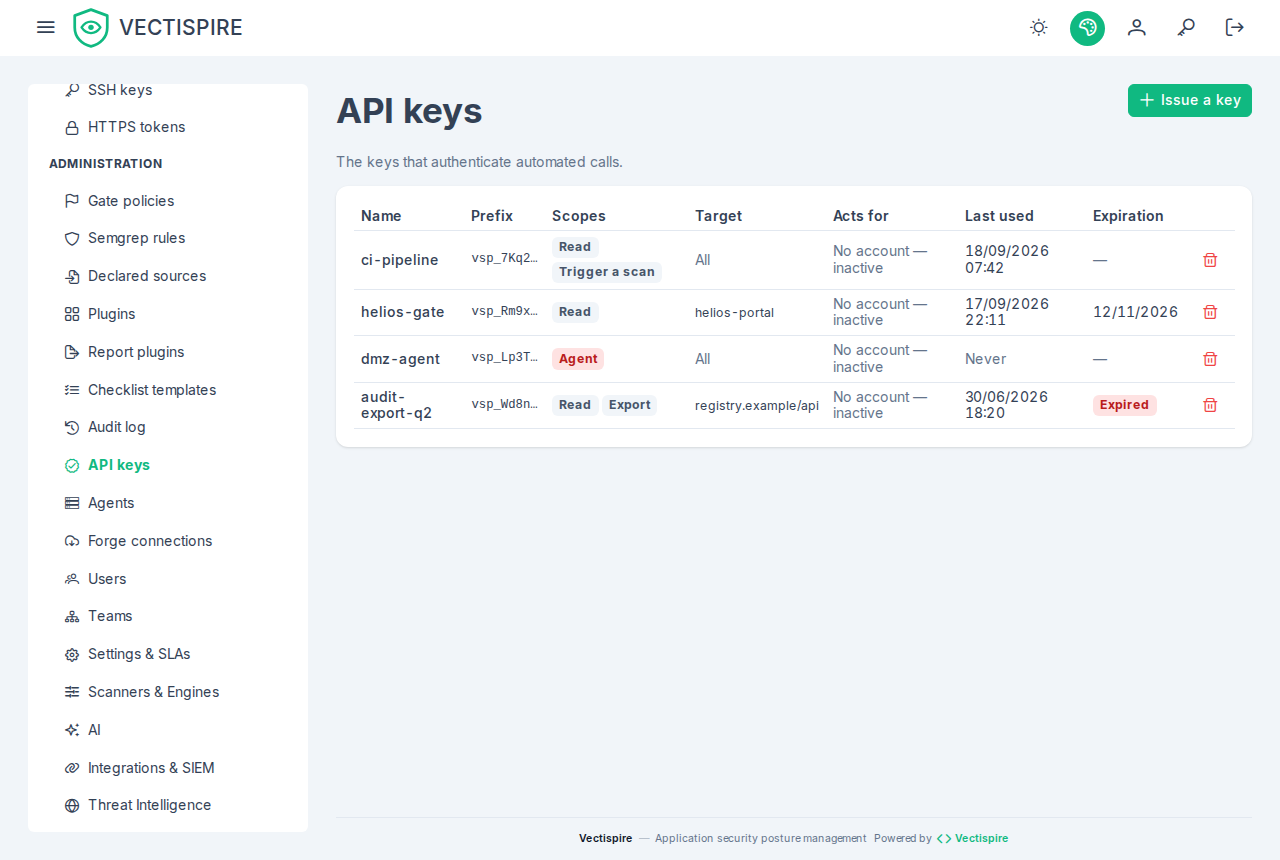
Issued from the interface, for machines rather than people: a CI gate, a SonarQube or Jenkins job, a script that exports an SBOM. A remote agent has a key too, but it is created with the agent, not here.
A key acts for an account
A key belongs to the account that issued it and acts for that account: it sees what the
account sees, and every write it makes is recorded in the audit log as
alice (API key ci) — the account, and the key beside it. Deactivate the account and its keys stop
working with it. A key issued before keys had an owner is listed as no account — inactive and
authenticates nowhere: revoke it and issue another.
Scopes
A key then passes only on the routes that accept a key, and only with a scope it holds:
| Scope | Allows |
|---|---|
read |
listing and reading repositories, containers, scans — a scan's SBOM among them, GET /api/v1/scans/{id}/sbom, in Syft's native JSON — issues, gate verdicts and the compliance summary; the solutions tree, a project read on its own, its components, and a project's or a solution's compliance |
scan |
triggering a scan of a repository or container, and asking the CI gate for a verdict |
export |
the generated documents: CycloneDX with its VEX — a project's consolidated CycloneDX among them — OpenVEX, CSAF, a target's SARIF and CSV, compliance PDF and evidence bundle, exports. Not the SBOM a scan produced, which is read |
sarif_import |
depositing an internal tool's SARIF report into a repository — only once the platform governor has declared the key as a SARIF source, see Plugins and SARIF imports. Never granted by default |
report_import |
depositing an internal pipeline's coverage or JUnit test report for a repository — only once the platform governor has declared the key as a source delivering coverage or test_report, see Importing coverage and test reports. It deposits no finding. Never granted by default |
Anything else — administration, triage, settings, users — refuses a key with 403, whatever the
account's role. That is the point: an administrator's key used by a pipeline is not an
administrator.
Give a CI gate a key with scan and nothing more — plus read if the pipeline also waits for the
scan it triggered, since following a scan reads it. CI examples
shows the keys a pipeline needs, one per job.
Restricting a key to one target
A key can be restricted to one repository or one container. It then sees only that target, within what its account sees: a restriction narrows, it never widens. A target that does not exist, or that the account cannot see, is refused at issuance. A key restricted to a repository never sees its project whole, even when that repository is the project's only one: the project export and its checklists answer it as absent.
Shown once
A key is displayed once, at creation. Vectispire stores what it needs to verify a presented key and cannot show you the value again.
Put it straight into your secret store. If it is lost, revoke it and issue another — that is a two-minute operation, and a key pasted into a chat window to avoid it is a permanent one.
Sending a key
| Header | For |
|---|---|
Authorization: Bearer zsk_… |
a key — the form to prefer |
X-API-Key: zsk_… |
the same key, for a client that cannot set Authorization; read only when Authorization is absent |
A session token is never accepted in X-API-Key. Each key has a budget of requests per minute
(VECTISPIRE_API_KEY_REQUESTS_PER_MINUTE, 600 by default); beyond it the answer is 429 with
Retry-After, so a looping job slows down instead of loading the control plane.
curl -fsS -H "Authorization: Bearer $VECTISPIRE_TOKEN" \
  "$VECTISPIRE_URL/api/v1/issues?repository_id=12"
Revoking
Revoke a key when the pipeline that used it is retired, when someone who could read it leaves, or when you are not sure. Revocation is immediate, and every use is in the audit log.
Three gestures revoke keys on their own:
- An administrator resetting an account's password revokes every key that account issued, as it closes its sessions. A reset is what one does to shut out somebody who had the account; a key they minted meanwhile would otherwise keep acting for it. The audit entry of the reset says how many keys went. Issue new ones afterwards.
- Changing your own password revokes every key you issued, for the same reason: one changes a
password because one believes it known, and a key minted with it acts for you whatever the password
becomes. The other sessions close too; the answer says how many keys went (
revokedApiKeys), and each is its own audit entry. Issue new ones for your pipelines afterwards. - Deleting a repository or a container revokes the keys restricted to it, with the grants that name it — a key never outlives its target, even through a restore that renumbers. The key itself goes, never only its restriction: a key without one would act with its account's whole visibility. Each key revoked this way is its own audit entry, under the key's id, and a revocation event for the SIEM; the deletion's entry says how many grants and keys went with the target.
A platform governor's key is revoked by a governor only, as its account is administered by a governor only: an administrator is refused, and the key stays.
Issuing a key does not ask for the password again. Only an administrator issues one, each issuance is in the audit log and forwarded to the SIEM, and an account signing in through single sign-on may have no local password to give — a re-authentication step would lock those administrators out of the screen rather than protect it.
In CI
Never in the repository, never in the job definition. See CI policy gate.