Plugins and SARIF imports
A plugin is your own analyser, packaged as a container image, that Vectispire runs during a scan beside Syft, Grype, Gitleaks, Checkov and Semgrep — and that reports what it found as SARIF. A SARIF import is the other half: a report an internal tool of yours already produced — an on-premise SonarQube, your own CI — deposited into a repository's backlog.
Both land in the same backlog, triaged once. Decision 0017 records why they work the way they do.
Read this first: exit code 0 means analysed
A plugin that exits on one of its declared exit codes and writes a SARIF log with an empty
results array has told Vectispire "I looked at this repository and found nothing". Every
issue that plugin opened on the repository is then resolved — triage, justifications and
all. If your analyser fails, exit with another code, or do not write the report, or write the
run without results, or set "executionSuccessful": false: each of those leaves the plugin's
issues exactly as they were and records the failure on the scan. Never swallow an error and
write an empty report.
Writing a plugin
The manifest
{
  "id": "acme-lint",
  "name": "ACME house rules",
  "image": "registry.acme.internal/sec/acme-lint@sha256:4f2d…(64 hex)",
  "languages": ["java", "kotlin"],
  "arguments": ["--sarif", "{output}", "{source}"],
  "output": "results.sarif",
  "exit_codes": [0, 1],
  "network": false,
  "network_justification": null,
  "timeout_seconds": 600,
  "signature": {
    "identity": "https://github.com/acme/lint/.github/workflows/release.yml@refs/tags/v4.2.0",
    "issuer": "https://token.actions.githubusercontent.com"
  }
}
| Field | What it means |
|---|---|
id |
2 to 40 lowercase letters, digits and inner hyphens. It is part of every issue the plugin opens: it can never be renamed or reused. |
name |
What the screens show. |
image |
Pinned by digest: repository@sha256:<64 hex>. A tag — even beside the digest — is refused. |
languages |
The languages the plugin reads, from the Semgrep catalogue's list: apex, bash, c, clojure, csharp, dockerfile, elixir, go, html, java, javascript, json, kotlin, ocaml, php, python, ruby, rust, scala, solidity, swift, terraform, typescript, yaml. |
arguments |
The command handed to the image's entrypoint, as a list — no shell is involved. {source} becomes /repo/source, {output} becomes /repo/output/<output>. |
output |
The file name the plugin writes its SARIF to, in /repo/output. Default results.sarif. |
exit_codes |
The exit codes that mean "analysed", findings or not. Default [0]. Any other code fails the plugin's step. |
network |
false unless the plugin genuinely needs to reach something — an internal rule mirror. true requires network_justification, 20 to 500 characters, recorded in the audit log. |
timeout_seconds |
10 to 900. It can shorten the scanners' fifteen minutes, never extend them. |
signature |
Optional: who must have signed the image — see Signing the image. |
What the plugin runs under
Exactly what every scanner Vectispire ships runs under — there is no option to loosen it:
- the analysed tree only, read-only, at
/repo/source(the repository's sub-path, when it has one). Not the rest of the workspace; - one empty writable directory,
/repo/output, where the report goes, holding at most 256 MiB and 4,096 files — in memory, never on the scanning machine's disk. Write logs to stdout or stderr as you like — the report is read from the file. A plugin that fills the directory is absent, even if it then writes a valid report: a write was refused, so the report may be missing what it could not write; - no file larger than 256 MiB anywhere,
/tmpincluded: past it the write fails (File too large) or the process is stopped; - no network unless the manifest declares it; no Docker socket, no capability,
no-new-privileges, a read-only root filesystem,/tmpand$HOMEas smallnoexecscratch space; - not root: the user that owns the workspace on the scanning machine. Your image must work as an arbitrary non-root uid;
- the scanner limits for memory (2 GB), processes and CPU, and your timeout;
- the report is read as a regular file (a link is refused), up to 256 MiB.
Rule or vulnerability databases belong inside the image, pinned with it. If the plugin must fetch them, declare the network exception and point it at an internal mirror: nothing is downloaded freely at start.
Try it with the same confinement before you register it:
docker run --rm --network none --cap-drop ALL --security-opt no-new-privileges \
  --read-only --tmpfs /tmp:rw,noexec,nosuid --user "$(id -u):$(id -g)" \
  --ulimit fsize=268435456 --tmpfs "/repo/output:rw,noexec,nosuid,size=256m,uid=$(id -u),gid=$(id -g)" \
  -v "$PWD:/repo/source:ro" \
  registry.acme.internal/sec/acme-lint@sha256:… --sarif /repo/output/results.sarif /repo/source
(Append ; cat /repo/output/results.sarif to your command, or run it through a shell, to see the
report: a tmpfs does not outlive the container.)
Signing the image
The digest says what runs; a signature says who built it. Declare the signer in the manifest
and every executor verifies the image with cosign before pulling it; an image that does not verify
is never run, and the plugin is refused (signature_unverified) with cosign's reason — or
(registry_authentication_required) when its registry would not let the signature be read.
A signer is required by default. A plugin whose manifest declares none is refused (unsigned)
on every executor, and nothing of it is started — unless the platform governor
waived the requirement for that plugin. The digest pins the bytes, but
not who pushed them: a registry, a mirror or a tag compromised upstream runs code over the source of
every project the plugin is switched on for, and having no network does not stop that code from
fabricating findings or hiding real ones in its report.
- Keyless (Sigstore):
identityis the signing certificate's identity — for a GitHub Actions workflow,https://github.com/<owner>/<repo>/.github/workflows/<file>@refs/tags/<tag>— andissuerits OIDC issuer (https://token.actions.githubusercontent.comfor GitHub Actions). Both are required and compared exactly; there is no pattern matching. The executor needs to reach the registry and Sigstore's public trust root. - With your own key:
"signature": {"public_key": "-----BEGIN PUBLIC KEY-----\n…"}, thecosign.pubofcosign generate-key-pair, and sign withcosign sign --key cosign.key <image>@<digest>. The transparency log is not consulted: the executor needs your registry and nothing of Sigstore, and your internal image names are published nowhere.
Check your signature the way Vectispire will before you register:
cosign verify --certificate-identity "<identity>" --certificate-oidc-issuer "<issuer>" <image>@<digest>
cosign verify --key cosign.pub --insecure-ignore-tlog=true <image>@<digest>
Changing the signer is a new manifest, audited like any other change. A mirror set with
VECTISPIRE_PLUGIN_REGISTRY must carry the signatures as well (cosign copy copies both).
A private registry is read with the executor's pull credentials. The verifier is handed, for the
length of its run, the credentials the executor's own pulls send to the image's registry — those of its
Docker configuration, see Registry credentials — in a file
readable by the executor's user alone, mounted read-only, erased with the container, and redacted from
anything cosign says. Vectispire stores none of them. If the registry still will not let the signature
be read — the executor holds no credentials for it, or the ones it holds are refused — the plugin is
refused (registry_authentication_required) with the reason saying which, never reported as an
image without a signature: nothing was read.
Running an unsigned plugin
When an image cannot be signed yet — an internal tool whose pipeline has no signing step — the platform governor waives the requirement for that one plugin, with a written justification:
- On screen, the plugin's detail shows Signature: required and, to the governor, Run unsigned…, which asks for the justification (20 to 500 characters — say why, and by when it will be signed). Once granted, the detail shows Runs unsigned (waiver) with the justification, who granted it and when, and the governor can Withdraw the waiver.
- Through the API:
PUT /api/v1/plugins/{id}/unsigned-waiverwith{"justification": "…"}, andDELETEon the same path to withdraw it (404 when there is none).
The waiver is audited (PLUGIN_SIGNATURE_WAIVED, PLUGIN_SIGNATURE_WAIVER_REVOKED, with the
justification) and forwarded to the SIEM (VECTI-SEC-021). It takes effect from the next scan: each
task carries it with the plugin, to the built-in worker and to agents alike. It lifts the duty to
declare a signer, nothing else: a signer the manifest declares is verified all the same, and a
signature that does not verify is refused whatever the waiver. A scan that ran the plugin under the
waiver says so on its Plugins card.
Switching the requirement off for a whole executor remains possible —
VECTISPIRE_PLUGIN_SIGNATURE_REQUIRED=false on the control plane (its built-in worker) or on an
agent — and runs every unsigned plugin there, with no trace of why. Prefer the waiver: it names the
plugin, says why, and is on the record.
What the report must say
- SARIF 2.1.0, one or more runs, each naming its tool (
tool.driver.name). - Every run carries a
resultsarray — possibly empty. A run withoutresults, or whose invocation says"executionSuccessful": false, is read as a failure. - Every result names its rule (
ruleId, or a rule it points at). The rule id is part of the issue's identity: renaming a rule loses the triage attached to it. - Locations are paths inside the tree: relative to
/repo/source, or absolute under it (/repo/source/src/App.java,file:///repo/source/src/App.java). A location outside it, a.., or a URL refuses the whole report. - Severity comes from
properties.security-severity(the CVSS-like score, on the result or its rule) when present, otherwise from the level:erroris high,warning(the default) medium,noteandnonelow. - A result of kind
passornotApplicable, or with an accepted suppression, is not a finding. - No
externalPropertyFileReferences, noinlineExternalProperties.
Registering a plugin
Only the platform governor registers, updates, enables or disables a plugin: it is third-party
code that will read the source of every project it is switched on for. Every change is in the audit
log with the manifest's digest, and forwarded to the SIEM (VECTI-SEC-021).
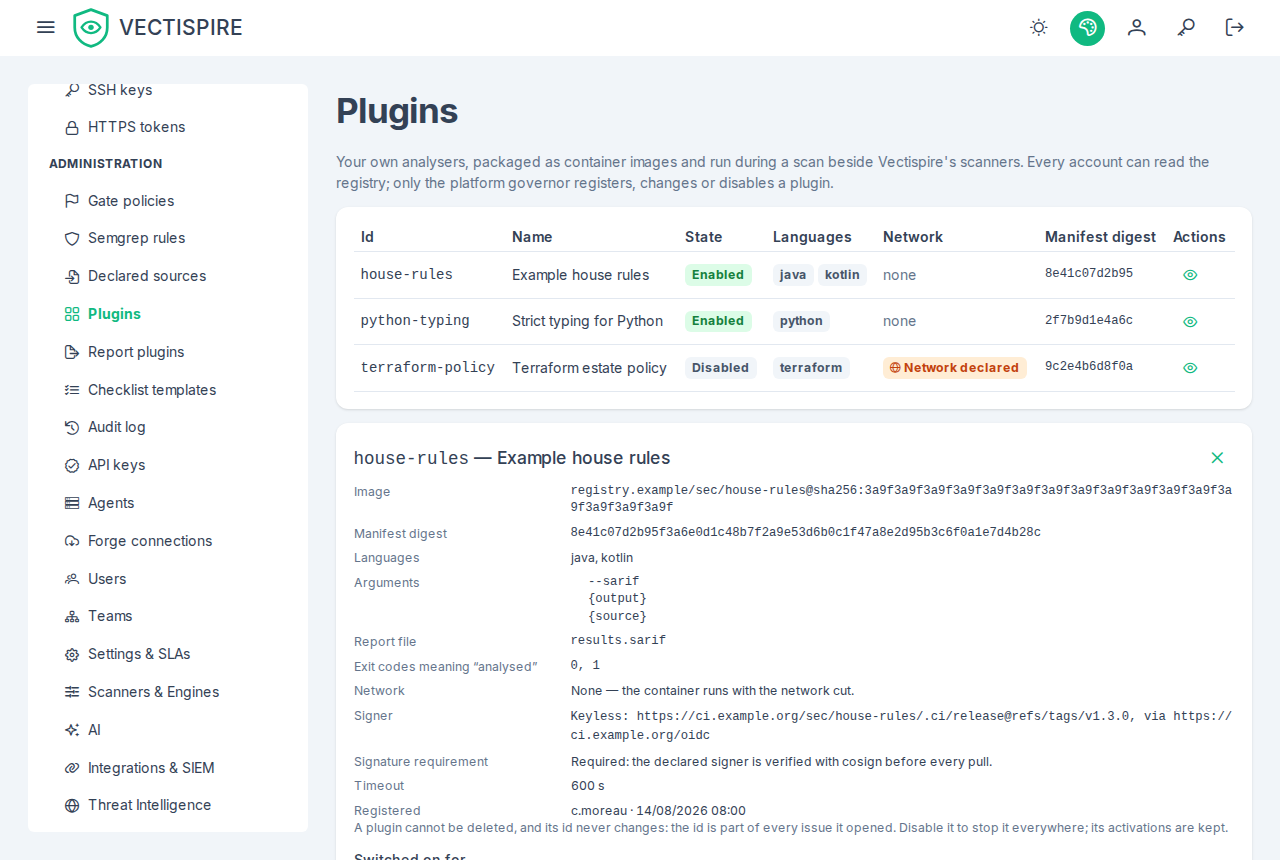
On screen, Plugins — in the sidebar under Administration, for the accounts that see that section — lists each plugin with its state, languages, network exception and the start of its manifest digest; the eye opens its detail: the image, the digest in full, the arguments in order, the report file, the exit codes, the network and its justification, the timeout, and who registered and last changed it. Governance readers also see the projects it is switched on for, as solution / project. The governor alone gets Register a plugin, the pencil that edits the manifest, and Enable / Disable. The form says where the id is typed that it can never be renamed or reused, and locks it when editing; a refusal — an id already taken, a tag beside the digest, a justification too short — stays in the form with the server's reason. The detail also shows whether the plugin must be signed, and the waiver when there is one. The page itself stays open to every account: a developer or a security champion, who has no Administration section, reaches it from the scan's Plugins card, whose plugin names link to it.
Through the API:
POST /api/v1/pluginswith the manifest registers it.PUT /api/v1/plugins/{id}with a new manifest updates it. A new image version keeps the id, and keeps every issue and its triage. The id itself never changes.PUT /api/v1/plugins/{id}/enabledwith{"enabled": false}stops it everywhere from the next scan, without forgetting where it was switched on.PUT/DELETE /api/v1/plugins/{id}/unsigned-waivergrants or withdraws the waiver of the signature requirement.- There is no delete: the id names every issue the plugin ever opened.
Every signed-in account can read the registry (GET /api/v1/plugins).
An internal registry. Set VECTISPIRE_PLUGIN_REGISTRY (and the same on each agent) to pull every
plugin image from your mirror: the registry host is replaced, the path and the digest are kept, so the
mirror can serve the image but not substitute another. The mirror must also carry library/busybox,
which holds each plugin's output directory, and — for signed plugins — sigstore/cosign/cosign, at the
digests Vectispire pins.
Switching it on for a project
A plugin runs on nothing until it is switched on for a
project: PUT /api/v1/projects/{projectId}/plugins/{pluginId} —
administrators, the CISO and the governor. A repository filed in no project runs no plugin.
DELETE switches it off; its open issues stay as they are.
On screen, in Solutions & projects each project offers Plugins to the governance roles: every registered plugin with its languages and a switch, on for those running on the project, with who switched it on and when. The switches work for administrators, the CISO and the governor; an auditor reads them. A plugin disabled on the platform says so on its row — its activation is kept and runs nothing until it is enabled again.
What a scan says about each plugin
Each plugin of a scan ends in one of four states:
| State | When | Its issues on the repository |
|---|---|---|
| produced | It ran and its report was read. | Opened for what it reports; resolved for what it no longer reports — its own issues only. |
| not applicable | None of its languages is in the repository; it was not started. | Left as they are. Not a failure. |
| refused | The executor would not start it: unsigned — no signer declared, a signer required, no waiver — signature_unverified — cosign did not verify the image against the declared signer — or registry_authentication_required — the image's registry would not let the signature be read. |
Left as they are, and the scan lists the failure under plugin <id>. |
| absent | It should have run and gave no usable report (pull failed, undeclared exit code, output directory full, no report, refused report, failed run). | Left as they are, and the scan lists the failure under plugin <id>. |
The scan's detail lists each plugin with its state (plugins: produced with its number of findings
and signature — verified, waived or not_required — not_applicable with the languages it
looked for, refused with its refusal and the reason, absent with the reason). On the scan's page,
the Plugins card shows them apart on purpose: produced in green with the number of findings in
its report — and ran unsigned (waiver) when it ran under a waiver — not applicable in grey with
the languages it looked for, refused — unsigned, refused — signature not verified or refused — registry authentication
required in red,
absent — failed in red with the reason. Each names its plugin, linked to the registry, and its
manifest digest. A plugin's findings say which tool and version reported them.
A checklist line measured on a plugin that was refused, and did not
produce since within the line's age, has no data, with the reason plugin_unsigned,
plugin_signature_unverified or plugin_registry_authentication_required rather than step_absent.
Languages are detected from file names and manifests (pom.xml, package.json, pyproject.toml,
go.mod…), within a bound; a repository too large to count runs every plugin rather than skipping
one wrongly.
The languages detected in a repository
Every repository scan counts the languages of its tree — the whole tree, whether or not a plugin is
switched on — and keeps the answer on the scan. It is spelled in the manifest's own vocabulary, the
list under languages above (java, typescript…), so a plugin's languages and a repository's are
compared as they are written:
GET /api/v1/repositoriesgives each repositorydetectedLanguages: the languages its newest completed scan found, sorted.nullmeans unknown — the repository has no completed scan yet, its newest one is from before this version, or the count stopped at its bound — and never "no language", which is[]. An older scan's answer is not borrowed: the newest completed scan describes the tree as it is now.GET /api/v1/solutionsgives each projectdetectedLanguages, the union over the repositories of the project the caller can see, andlanguagesUnknownFor, the identifiers of those among them whose languages are unknown. A project reading["java"]with a repository inlanguagesUnknownFormay hold more than Java; the union speaks only for the others.
On screen, the Plugins dialog of a project in Solutions & projects
opens on the project's languages, then sets each plugin's against them: the languages the project holds
are highlighted, with "Present in this project: …" beneath; a plugin sharing none says "No language of
this project" — at the next scan it would be not applicable and not start. When some of the
project's repositories have not been counted yet, the dialog names them ("Repositories not yet scanned
for languages (N): …"), and a plugin sharing no language with the others says only that none was found
so far. None of this blocks a switch: the count is one push old at best, and switching a plugin on
ahead of the language that will need it is legitimate. The tree shows a project's union as small tags
when it has one, and nothing otherwise; Repositories shows each
repository's, with "not yet known" for null and "no language detected" for [].
An image scan has no tree and records no language.
How an issue keeps its identity
A plugin issue is identified by its rule, its normalised path and the tool — plugin:<id> — on its
repository. The image, its digest and the tool's version are not part of it, which is what lets a
plugin be upgraded without losing triage. Renaming the plugin, the rule, or moving the file makes a new
issue. The line number is never part of it.
Plugin and imported findings do not fail a CI gate unless the gate policy includes them
(include_plugins, see gate policies): a third-party tool's "critical" must not
break a build nobody warned. They are not counted in the security figures either.
Importing SARIF from an internal tool
Only from inside the organisation. An on-premise SonarQube, your own CI job — a tool that already had the code. Never a hosted service outside the organisation to which the code would have been handed. Vectispire cannot tell from a file where it was produced, so the rule is enforced by declaring each internal source, and by what the declaration binds.
1. Issue the key
On API keys, issue a key with the sarif_import scope (it is never granted by
default) from an account that may cause effects — not an auditor. Restrict it to a repository when the
source feeds one.
2. Declare the source
The platform governor declares it — that is the platform stating "this producer is inside the organisation":
curl -X POST https://vectispire.example/api/v1/sarif-sources \
  -H "Authorization: Bearer $GOVERNOR_SESSION" -H "Content-Type: application/json" \
  -d '{"slug": "payments-ci", "name": "Payments CI", "api_key_id": "<key id>",
       "project_id": 12, "tools": ["Semgrep OSS", "SonarQube"]}'
- one key, one source: the key names the source when it uploads;
- exactly one scope — a project (
project_id) or a repository (repository_id), never the whole estate; - the tools it may deliver, compared with each run's
tool.driver.namewithout regard to case. A report from any other tool is refused — including a hosted service's, which names itself.
The slug is part of every imported issue's identity: name the producer, not the key. Declaring the same slug again with a new key — to rotate it — continues the same backlog.
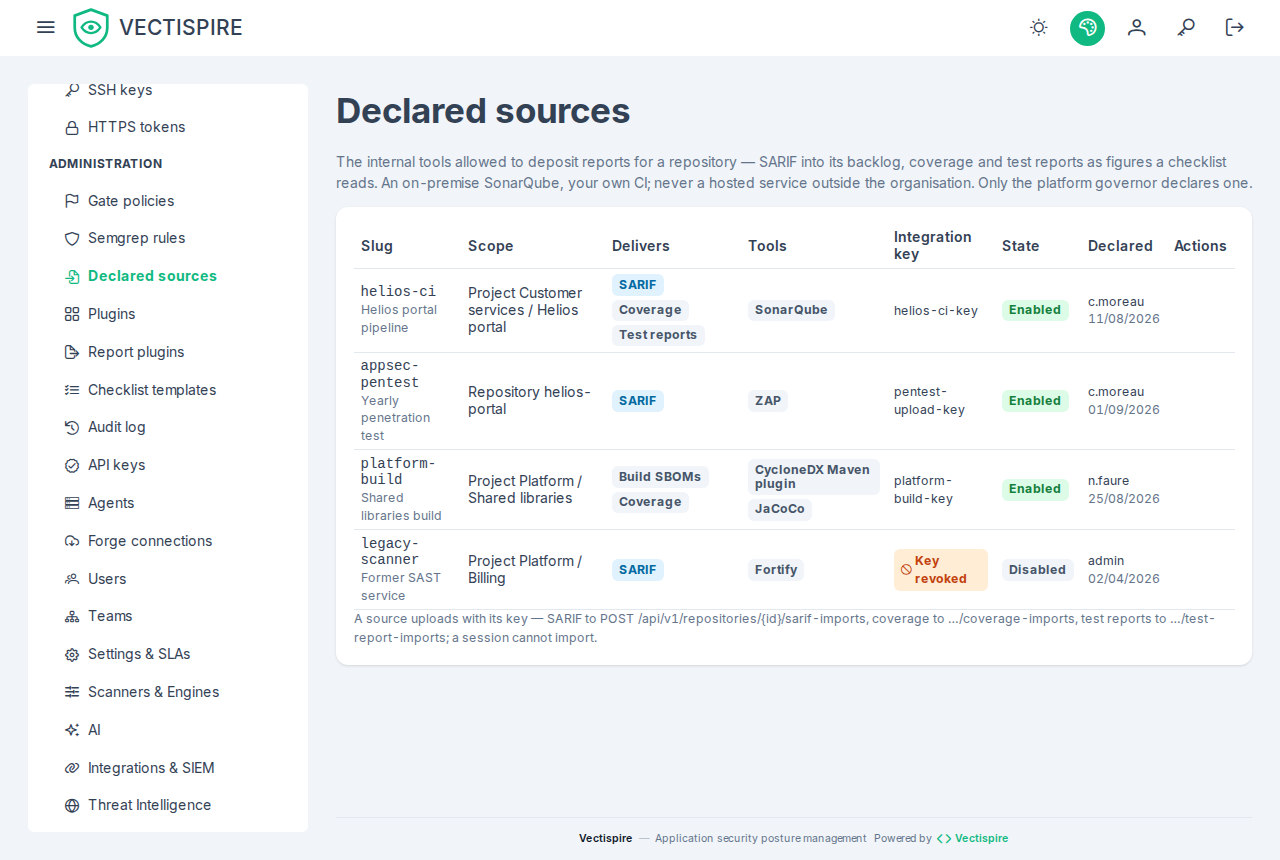
On screen, Declared sources, in the Administration section for the governance roles, lists the
declarations — slug and name, the scope by project or repository name, what each delivers (SARIF,
coverage, test reports), the tools, the key by its name — the CISO and the auditor, who cannot open
API keys, read it too, and a revoked key reads Key revoked — and who declared it. The governor has
Declare a source:
the kinds are ticked (SARIF by default, at least one), the key is chosen among the unexpired keys
holding the scope of every ticked kind — sarif_import for SARIF, report_import for the other two —
the scope is a project or a repository, and the tools, separated by commas, are asked only while
SARIF is ticked. Disabling
stops a source's imports; removing it keeps the issues it imported, under its slug.
3. Upload
curl -X POST https://vectispire.example/api/v1/repositories/42/sarif-imports \
  -H "Authorization: Bearer $VECTISPIRE_SARIF_KEY" \
  -H "Content-Type: application/sarif+json" \
  --data-binary @results.sarif
The answer (201) says what the report did: resultsCount, createdCount, resolvedCount,
reopenedCount, the tools — a list, one name version per run, a comma in a version written as a
semicolon — and the SHA-256 of the document you sent. It is refused with:
| Status | Why |
|---|---|
403 |
not an integration key, a key no enabled source is declared for, or a tool the source is not declared for |
404 |
a repository the key cannot see, or outside the source's scope — answered as if it did not exist |
400 |
not SARIF 2.1.0, a location outside the repository or absolute, a link to external content, a run that failed or has no results |
413 |
larger than VECTISPIRE_MAX_BODY_SARIF_IMPORT (32 MB) |
Locations must be relative to the repository's root (src/App.java): the checkout path of your
CI is unknown to Vectispire, so an absolute path is refused. Each run's tool is its own scope: a later
report from the same tool resolves what it no longer reports on that repository, and touches nothing
else — no other tool's issues, no plugin's, no scanner's.
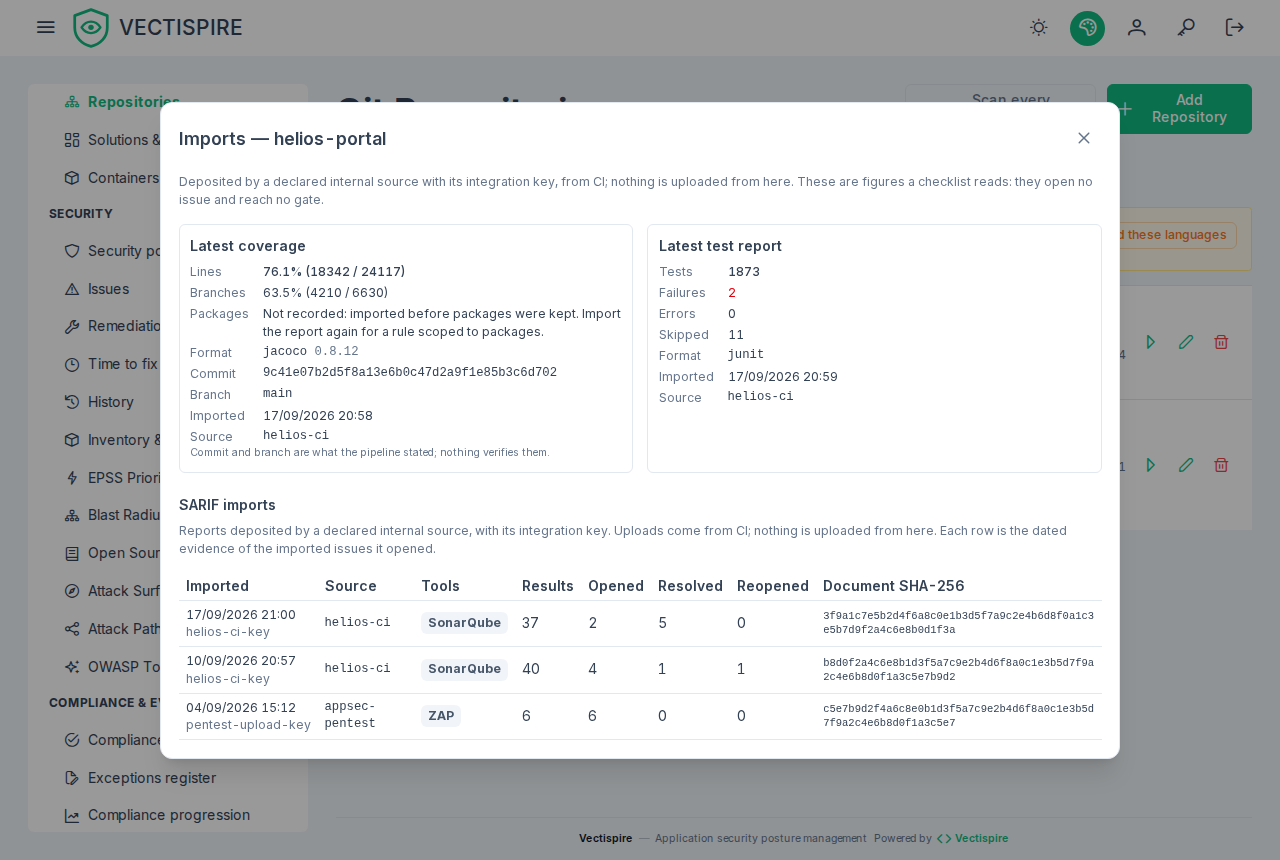
Every repository row on Repositories has Imports, which opens that repository's latest coverage and test report (see below) and then its SARIF import history, read-only: when and by which source and account, the tools (one tag each), the counts opened, resolved and reopened, and the document's SHA-256. Nothing is uploaded from the interface.
Imported issues say where they came from: type imported, the source, and the tool's name and
version. An auditor tells "analysed by Vectispire" (types plugin, sast…) from "declared by the CI"
(imported) at a glance: the backlog says it under the type ("analysed by Vectispire · acme-lint",
"declared by payments-ci · SonarQube"), its type filter offers both, and an issue's page has a
Provenance card with the plugin or the source, the tool and version, and the tool key that scopes
its resolution. Every import is kept with its document hash and in the audit log; a refused
one is a SIEM event (VECTI-SEC-023).
Example: GitLab CI running Semgrep
sast-to-vectispire:
  image: semgrep/semgrep@sha256:…
  script:
    - semgrep scan --config p/default --sarif --output semgrep.sarif .
    - >
      curl --fail-with-body -X POST
      "$VECTISPIRE_URL/api/v1/repositories/$VECTISPIRE_REPOSITORY_ID/sarif-imports"
      -H "Authorization: Bearer $VECTISPIRE_SARIF_KEY"
      -H "Content-Type: application/sarif+json"
      --data-binary @semgrep.sarif
VECTISPIRE_SARIF_KEY is a masked, protected CI variable. Declare the tool name your report carries —
look at runs[0].tool.driver.name in semgrep.sarif. Semgrep writes paths relative to the directory
it scanned, which is what Vectispire expects when it scans the repository root.
Example: SonarQube on your premises
SonarQube does not write SARIF by itself. The step that turns your SonarQube project's issues into a
SARIF log — a small job reading its Web API (/api/issues/search), or a converter your team has vetted
— is yours; keep it inside the organisation, like SonarQube itself. Then:
curl --fail-with-body -X POST \
  "https://vectispire.example/api/v1/repositories/42/sarif-imports" \
  -H "Authorization: Bearer $VECTISPIRE_SARIF_KEY" \
  -H "Content-Type: application/sarif+json" \
  --data-binary @sonarqube.sarif
Declare the source with the driver name your converter writes (for example SonarQube), and make sure
the paths are relative to the repository root, not to SonarQube's project base directory if they
differ.
What the declaration can and cannot prove
It cannot prove a file did not come from a SaaS: whoever holds a declared key can upload what they have. What it gives you is a named, audited decision by the platform governor binding one key to one producer and one scope; a tool allow-list that refuses a report from anything else; the hash of every accepted document, to match a report to the pipeline run that produced it; and a SIEM event on every refusal. Who holds a declared key is then your organisation's discipline, and the audit trail makes it reviewable.
Importing coverage and test reports
The same declared sources can send a coverage report and a JUnit test report for a repository — the figures a security checklist will read (decision 0032). They follow the SARIF rules above, from inside the organisation and from a declared source, and differ in one respect: they open and resolve no issue. A coverage figure is not a finding.
1. Issue the key and declare what the source delivers
A source declares its kinds: sarif, coverage, test_report, sbom, one or several. One
pipeline is one source, even when it sends SARIF and coverage. Each kind needs its own scope on the key:
| Kind | The key holds | Tools |
|---|---|---|
sarif |
sarif_import |
required: the tools it may deliver |
coverage, test_report, sbom |
report_import |
none — refused on a source that delivers no SARIF |
sbom is the build's CycloneDX SBOM, described below.
report_import is never granted by default, and it is a scope of its own so that a key issued to send
a coverage figure never deposits findings. A declaration without kinds is sarif alone, which is
what every source declared before this version stays.
curl -X POST https://vectispire.example/api/v1/sarif-sources \
  -H "Authorization: Bearer $GOVERNOR_SESSION" -H "Content-Type: application/json" \
  -d '{"slug": "payments-ci", "name": "Payments CI", "api_key_id": "<key id>",
       "project_id": 12, "kinds": ["coverage", "test_report"]}'
2. Upload
Coverage — JaCoCo XML, Cobertura XML or an lcov tracefile. The format is declared, never guessed: a truncated JaCoCo file is not read as lcov by accident.
curl --fail-with-body -X POST \
  "https://vectispire.example/api/v1/repositories/42/coverage-imports?format=jacoco&commit=$CI_COMMIT_SHA&branch=$CI_COMMIT_REF_NAME" \
  -H "Authorization: Bearer $VECTISPIRE_REPORT_KEY" \
  -H "Content-Type: application/xml" \
  --data-binary @target/site/jacoco/jacoco.xml
format is jacoco, cobertura or lcov (send lcov as text/plain). The answer (201) carries the
lines covered and total, the branches when the report counted any (null otherwise — never 0 of 0),
the tool version when the report names one, and the document's SHA-256.
Test report — one JUnit XML document as application/xml, or a zip of them as application/zip,
since most build tools write one file per test class:
(cd target/surefire-reports && zip -q ../surefire-reports.zip TEST-*.xml)
curl --fail-with-body -X POST \
  "https://vectispire.example/api/v1/repositories/42/test-report-imports?commit=$CI_COMMIT_SHA" \
  -H "Authorization: Bearer $VECTISPIRE_REPORT_KEY" \
  -H "Content-Type: application/zip" \
  --data-binary @target/surefire-reports.zip
The answer carries the documents, suites and tests counted, with the failures, errors and skipped.
Vectispire keeps the figures, never the document: the counts, each suite's totals, the
document's hash, the source and the key. commit and branch are optional and kept as the pipeline
states them — they are its word, verified against nothing.
scripts/vectispire-cli.sh does both, and prints the server's refusal when there is one:
./vectispire-cli.sh coverage --repo-id 42 --format jacoco --file target/site/jacoco/jacoco.xml --commit "$CI_COMMIT_SHA"
./vectispire-cli.sh test-report --repo-id 42 --file target/surefire-reports.zip --commit "$CI_COMMIT_SHA"
Refused with:
| Status | Why |
|---|---|
403 |
not an integration key, a key without report_import, a key no enabled source is declared for, or a kind its source is not declared for |
404 |
a repository the key cannot see, or outside the source's scope — answered as if it did not exist |
400 |
a format not declared or not one of the three, a body that does not read as it, a report that counts no line or no test, a commit that is not a hexadecimal name, a zip past its guards |
413 |
larger than VECTISPIRE_MAX_BODY_COVERAGE_IMPORT (16 MB) or VECTISPIRE_MAX_BODY_TEST_REPORT_IMPORT (32 MB) |
An empty report is refused, not recorded as zero: a coverage report with no line, or a test report with no test case, says the step did not run — and "ran, found nothing" is a different claim (decision 0007). The readers load no DTD and resolve no entity; a zip is inflated in memory and counted as it comes out, at most 5,000 entries, 32 MB each and 256 MB in all, and an archive inside it is refused.
A coverage report is kept per package too, for the checklist rules that measure
a scope of packages: each JaCoCo
<package> with its own counters, each Cobertura <package> counted from the lines of its classes
(never those repeated under a method), and for lcov each directory holding an SF: file, its records
merged as for the totals. The packages are kept only when they add up to the report's totals, and
the answer's packagesState says what happened: kept; too_many — more than 10,000 packages;
path_refused — a path longer than 1,000 characters, or carrying a control character, which is never
clipped; inconsistent — counts per package that do not add up to the totals, or that do not read.
Whatever it says, the report is accepted and its totals are what they were: only a rule with a scope
reads the packages, and has no data where none were kept. An import from before this version has no
packagesState (null) and no package; upload the report again to measure a scope on it. Packages go
with their import, which goes with its repository.
On screen, the repository's Imports dialog opens with its latest coverage — lines and branches as a percentage with their counts, or Not counted by the report when there were no branches, the format and tool version, the commit and branch as the pipeline stated them, when and from which source — and its latest test report: tests, failures, errors and skipped. Nothing is uploaded from the interface.
Each accepted import is in the audit log (COVERAGE_IMPORTED, TEST_REPORT_IMPORTED); a refusal for
what the key claimed is audited as REPORT_IMPORT_REFUSED and sent to the SIEM as VECTI-SEC-027. A
repository's latest fifty imports of each kind are read at GET /api/v1/repositories/{id}/coverage-imports
and …/test-report-imports.
Importing a build's SBOM
The scanner reads the source tree. For a Maven tree it reads the poms, so a version managed by a
parent or a BOM comes out as UNKNOWN, and a library pulled in transitively is not listed at all.
A checklist line asking whether snakeyaml is used, and at which version, is then answered "not in
its SBOM" — a false "no". The build resolved the graph: send its SBOM, and Vectispire completes the
scanner's inventory with it (decision 0039).
1. Declare the source with sbom
The key holds report_import and the source is declared with the kind sbom — on its own or beside
coverage and test_report: one pipeline, one source.
curl -X POST https://vectispire.example/api/v1/sarif-sources \
  -H "Authorization: Bearer $GOVERNOR_SESSION" -H "Content-Type: application/json" \
  -d '{"slug": "ledger-ci", "name": "Ledger CI", "api_key_id": "<key id>",
       "project_id": 12, "kinds": ["coverage", "test_report", "sbom"]}'
2. Produce the SBOM in the build, and send it
With Maven, cyclonedx-maven-plugin's makeAggregateBom writes one document for every module of
the build; with Gradle, the CycloneDX plugin's cyclonedxBom task. Either writes CycloneDX JSON,
spec 1.4, 1.5 or 1.6 — the versions read.
mvn -B org.cyclonedx:cyclonedx-maven-plugin:2.9.1:makeAggregateBom -DoutputFormat=json
curl --fail-with-body -X POST \
  "https://vectispire.example/api/v1/repositories/42/build-sbom-imports?commit=$CI_COMMIT_SHA&branch=$CI_COMMIT_REF_NAME" \
  -H "Authorization: Bearer $VECTISPIRE_REPORT_KEY" \
  -H "Content-Type: application/vnd.cyclonedx+json" \
  --data-binary @target/bom.json
application/json is accepted too. The CLI does the same:
./vectispire-cli.sh build-sbom --repo-id 42 --file target/bom.json --commit "$CI_COMMIT_SHA" --branch "$CI_COMMIT_REF_NAME"
The answer (201) carries the spec version, the tool that wrote the document, the components it
listed, the document's SHA-256 and completedScanId — the scan it completed, or null when the
repository has no completed scan holding an SBOM yet. Nothing the document refers to is fetched:
external references, a bom-link, a $schema are never followed.
What it changes, and what it does not
A scan's inventory is what its scanner listed, completed by the newest build SBOM of its repository that states the scan's branch, or no branch:
- Union. Everything the scanner listed stays — a front end beside the Maven tree, a vendored file; everything only the build lists is added — the transitive libraries.
- One package, matched by its purl, version and qualifiers aside. The Maven plugin's default
?type=jaris dropped on reading, so itspkg:maven/org.example/ledger-model@1.4.0?type=jarand the scanner'spkg:maven/org.example/ledger-model@1.4.0are one package. A row without a purl matches nothing. - The build's stated version wins — over
UNKNOWN, and over a version the scanner read off a manifest, since the build packaged what it states. The scanner's version is kept beside it. - When. As soon as the SBOM is accepted, the repository's newest completed scan is completed; every later scan is completed by the newest SBOM when its inventory is written, so a nightly scan of an unchanged tree keeps the build's versions. Older scans keep what they were given. A newer SBOM that no longer lists a package gives the scanner's row back.
- Not a scan. A scan whose SBOM step failed is not completed: the build's word completes a scanner's inventory, it does not stand in for a scan that did not look. One whose SBOM the retention purged after its inventory was written still holds the scanner's rows, and is completed. Vulnerability matching still runs on the scanner's SBOM, inside the scan, and an SBOM opens and resolves no issue.
Every reader reads the same completed rows: the component search shows each row's source —
build beside a version the build stated, with what the scanner read in its tooltip; the project's
consolidated inventory, its CycloneDX export and the project export say who listed each
component (sources, export schema 1.1); the licence inventory counts the build's components with
the licences it declares, and its tallies move when an SBOM arrives; a checklist line
component_versions or component_present reads the newest analysed scan's components, completed — the transitive library
present, the BOM-managed version stated.
Refused with:
| Status | Why |
|---|---|
403 |
not an integration key, a key without report_import, a key no enabled source is declared for, or a source not declared for sbom |
404 |
a repository the key cannot see, or outside the source's scope — answered as if it did not exist |
400 |
not CycloneDX JSON (a Syft or SPDX document, XML), a specVersion other than 1.4 to 1.6, no components — a document that lists nothing is not one that found nothing — more than 50,000 components, a component without a name or wider than the inventory's columns, a commit that is not a hexadecimal name |
413 |
larger than VECTISPIRE_MAX_BODY_SBOM_IMPORT (32 MB) |
Each accepted SBOM is in the audit log (BUILD_SBOM_IMPORTED), with its SHA-256 and the scan it
completed; a refusal for what the key claimed is REPORT_IMPORT_REFUSED, sent to the SIEM as
VECTI-SEC-027. A repository's latest fifty are read at
GET /api/v1/repositories/{id}/build-sbom-imports, each with the newest scan it completed. The SBOMs
leave by the evidence window (evidence_retention_days) and with their repository; a scan keeps
the inventory it was given.
Analysers that compile
CodeQL for Java, SpotBugs and similar tools need to build the code, which the read-only tree and the cut network forbid. A dedicated writable copy of the tree and a network limited to your internal dependency mirror are designed (decision 0017) but not yet available. Until then, run them in your own CI and import their SARIF as above.